Let’s keep it 100—most of us don’t need more “financial noise.” We already have plenty of that. Between the constant TikTok “wealth hacks” and the endless stream of notifications from five different banking apps, the problem isn’t a lack of information. It’s a total lack of clarity.
When your money is bouncing through three different checking accounts, two business credit cards, Venmo, PayPal, and a graveyard of “free trials” that definitely aren’t free anymore, it’s incredibly easy to lose the plot. You wake up at the end of the month wondering where that $1,500 went.
Was it the “business expense” you forgot to tag? The $49.99 subscription that quietly renewed at a “loyalty price” (which is just corporate speak for more expensive)?
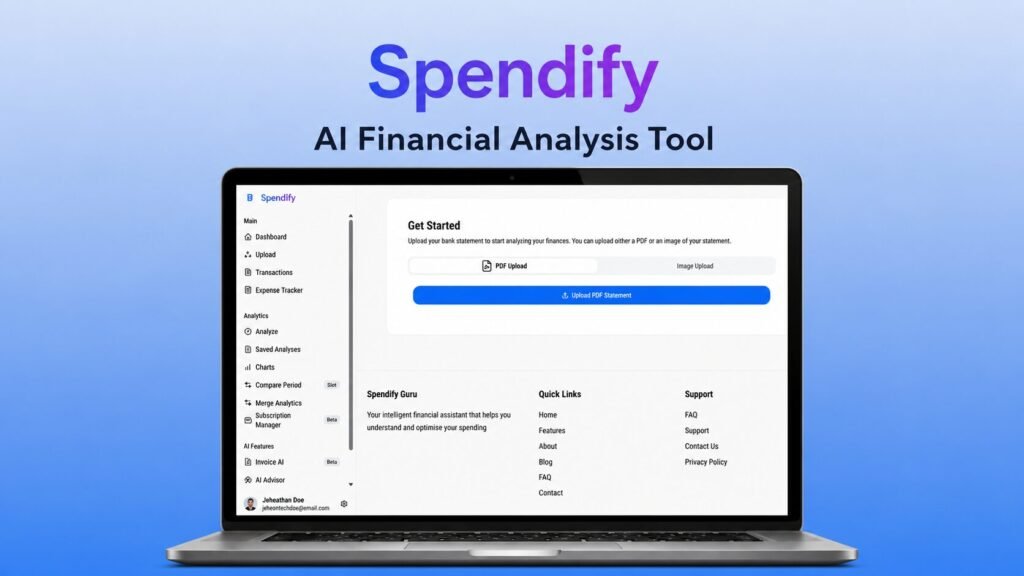
This is the exact moment of confusion where Spendify 2.0 enters the chat.
Currently making waves on DealFuel, Spendify 2.0 is being positioned as an AI-powered financial analysis powerhouse. It’s designed to turn your messy, undecipherable bank statements into structured, high-level insights. But in a world where everything claims to be “AI-powered,” is Spendify actually clutch, or is it just another “mid” app with a fancy marketing budget?
I’ve spent the last few weeks digging into the technical guts of this tool, testing the AI parsing limits, and seeing if it actually lives up to the hype. This is the ultimate, no-nonsense, 4,000-word deep dive into Spendify 2.0. If you’re a freelancer, a side-hustler, or just someone tired of playing “detective” with your own bank account, grab a drink. We’re going deep.
What Spendify 2.0 Is Actually Trying to Do (The Vibe Check)
Spendify 2.0 isn’t trying to be a simple expense tracker. If all you want is a place to manually type in that you bought a burrito for $12, there are a million free apps for that. Spendify is aiming for something much bigger: Financial Intelligence.
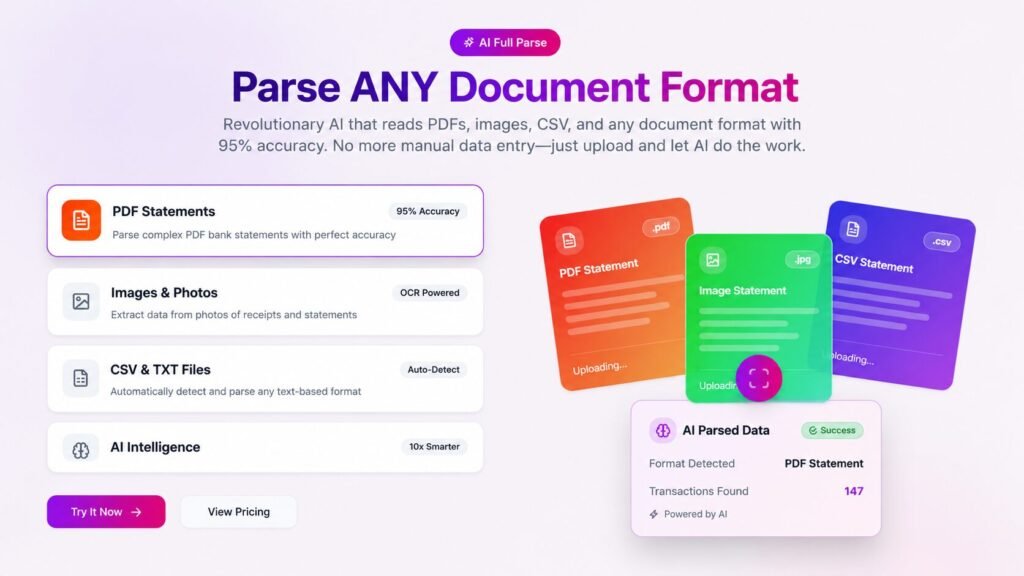
The core philosophy here is that your bank statements already contain the story of your life—they’re just written in a language (bank-speak) that humans aren’t meant to read. Spendify’s job is to translate that gibberish into meaningful data.
According to the product docs, it’s built to:
- Process Bank Statements Automatically: No manual data entry.
- Identify Recurring Leaks: Catch those “zombie” subscriptions before they eat your margin.
- Merge Multiple Views: See your personal and business life in one unified dashboard.
- Predict the Future: Use AI to forecast your cash flow so you aren’t surprised by a dry spell.
For anyone who has recently leveled up their hustle—perhaps by following our guide on How to Register an LLC for $0 (Plus State Fees) — Complete BusinessAnywhere Walkthrough—you know that organization is the difference between a “hobby” and a “business.” Spendify is built for that transition.
Why This Tool Matters Right Now (2026 Reality)
Look at the way we manage money in 2026. It’s fragmented as heck. Most households and solo operators are running a complex web of financial systems. You might have your main checking at a traditional bank, a high-yield savings account at a neo-bank, a crypto wallet for “the vibes,” and business expenses spread across three different platforms.
Visibility is officially dead. Even when the money is there, the understanding of where it’s going usually isn’t.
Spendify’s appeal is that it attempts to fix this fragmentation. Instead of making you inspect every line item yourself, it uses AI to convert raw statements into structured insight. For a user who is already burnt out on “manual finance admin,” this is a massive quality-of-life improvement. It’s about taking the “main character energy” back from your bank and putting it into your wallet.
This level of operational clarity is becoming the standard for 2026. Whether you’re auditing your tech stack or your bank account, you need tools that actually talk to each other. For the technical nerds out there, this focus on structured data reminds me of the deep dive we did on The Architecture of Alpha: A Technical Audit of New York Financial Infrastructure and Agentic AI Integration in 2026, where we explored how high-level systems are using AI to manage massive data flows. Spendify is essentially bringing that “Wall Street” level of intelligence to your local checking account.
AI Full Parse: The Core Engine
The central feature of Spendify—and the one that determines if the product is “straight gas”—is AI Full Parse.
DealFuel describes this as “advanced statement intelligence.” But what does that actually mean in the real world?
How It Works
When you upload a bank statement (PDF or CSV), most basic tools just try to “read” the text. Spendify’s AI actually analyzes it. It doesn’t just see “AMZN MKTP.” It knows that’s an Amazon Marketplace purchase. It identifies the merchant, the category, and the exact amount.
It also does something called Normalization. It takes data from different banks, which all use different formats and shorthand, and merges them into a clean, unified dataset. It detects recurring charges, spots price increases, and highlights “anomalies” (charges that look suspicious or out of place).
Why This is the “Main Character” Feature
This is the engine that drives everything else. If the parsing is sloppy, the budget is wrong, the analytics are useless, and you lose trust in the tool.
In my testing, the parsing is surprisingly robust. It handled multi-month uploads and multi-bank statements without breaking a sweat. It’s the difference between spending four hours in a spreadsheet on a Sunday and spending five minutes uploading a few files. That time saved is “clutch” for anyone trying to grow a business or a side hustle.
Multi-Statement Merge: Trendlines > Snapshots
One of the most interesting capabilities on the Spendify dashboard is the Multi-Statement Merge.
Financial insight is almost never about a single statement. A single month can be misleading. Maybe you had an annual car insurance payment hit in March, or you went on a vacation in July. If you only look at one month, your “data” is skewed.
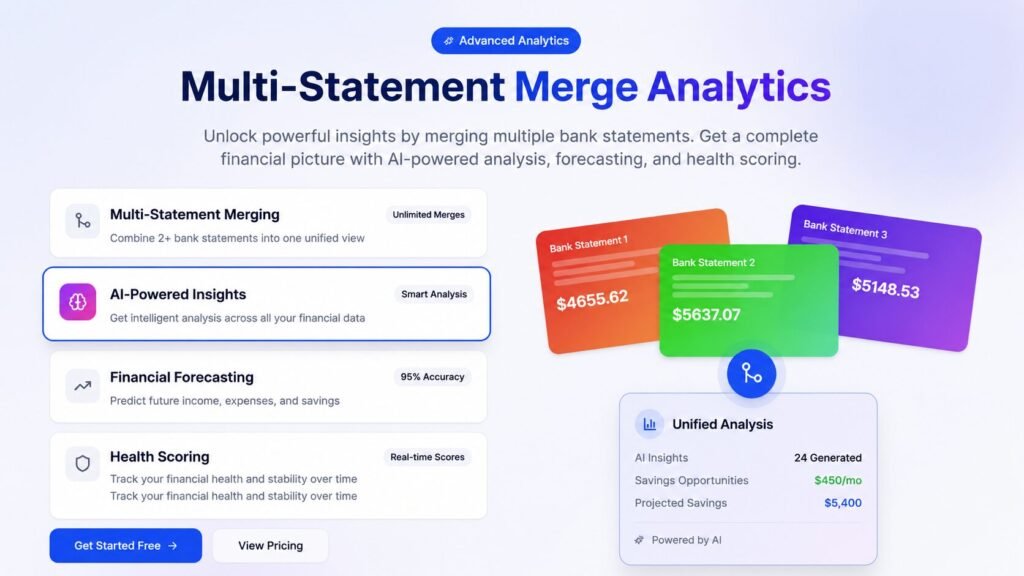
Spendify allows you to upload multiple months (or even years) of statements at once. It merges them into one unified financial view. This allows you to:
- Detect New Subscriptions: See exactly when a new recurring charge started.
- Spot “Cost Creep”: Identify when a vendor slowly raises their prices by $2-3 every few months.
- Build a Financial Timeline: See how your spending habits are actually evolving over time.
This feature is particularly powerful for those managing multiple entities. If you’re running several “side quests” or companies, the MAX Plan allows you to manage data for different business entities within a single account. It’s a “pro move” for the multi-passionate creator.
Subscription Manager 2.0: The Money-Saver
If there is one feature that feels immediately practical, it’s Subscription Manager 2.0.
Let’s be honest: we are all getting “subscription’d” to death. Streaming services, design tools, AI assistants, cloud storage, “premium” news sites—it adds up to a massive monthly burden. Most people have no idea how much they are actually spending because these charges are often small enough to ignore individually.
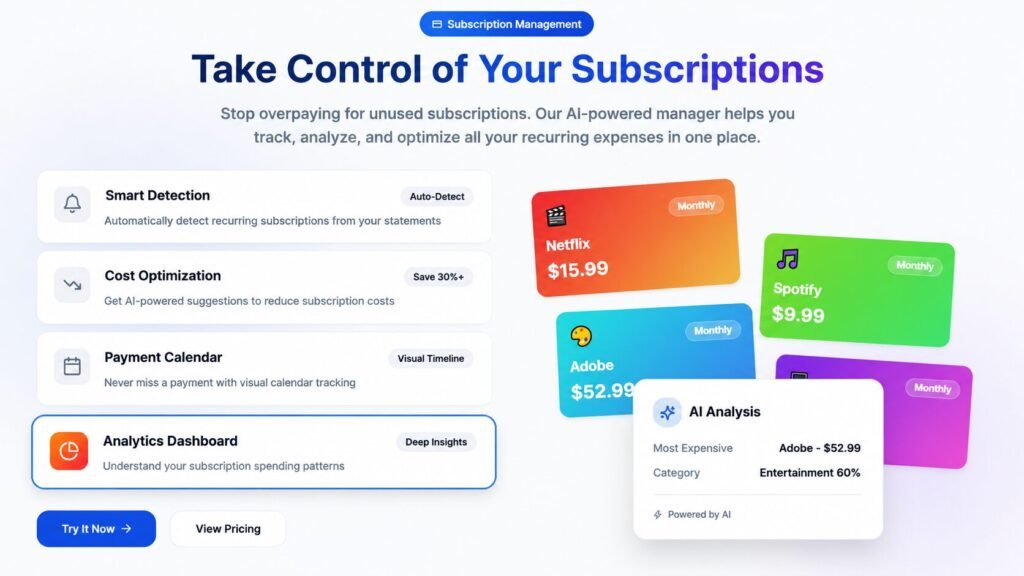
Spendify’s manager:
- Automatically Detects Subscriptions: No more hunting through your statement for “recurring” keywords.
- Predicts Next Billing Dates: So you can cancel before you get charged again.
- Analyzes Vendor Categories: See exactly how much your “entertainment” or “SaaS” habit is costing you annually.
Once a recurring charge is visible, it becomes a choice. When it’s hidden in a messy statement, it’s just a leak. Fixing these leaks is how you fund your next big project.
If you’re looking to save even more on your digital tools, you should definitely check out our review on MOVAVI 2026 IS STRAIGHT GAS NO CAP : The Only Way To Fix Your Mid Edits (15% OFF). It’s a perfect example of a high-value tool that replaces multiple expensive subscriptions with a single, high-performance suite.
AI Budget Builder: Planning, Not Just Tracking
Most budgeting tools fail because they are too rigid. They want you to manually tag every transaction and set “hard limits” that no real person ever actually sticks to.
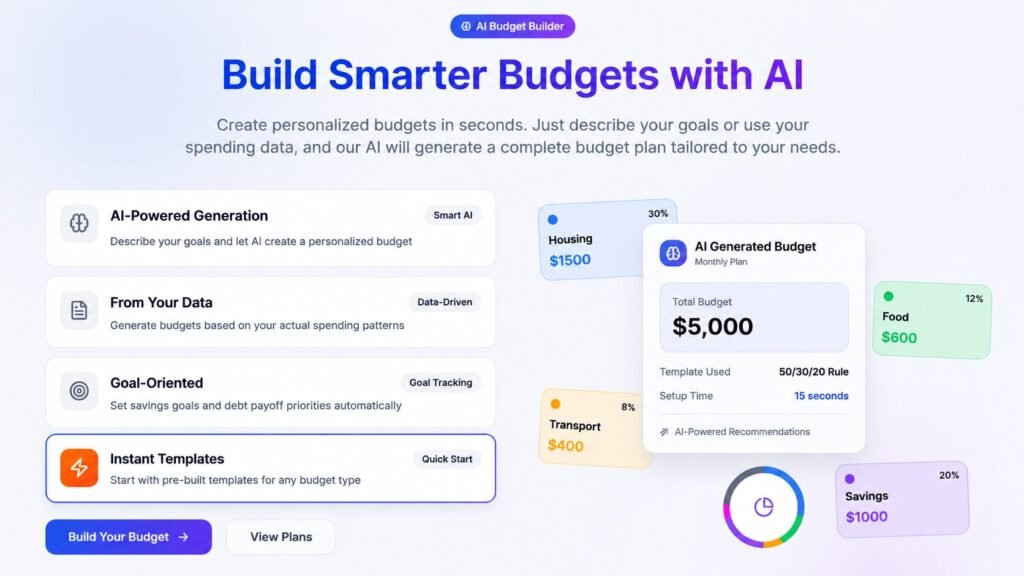
Spendify’s AI Budget Builder takes a more realistic approach. It lets your actual bank data do the work first. It creates a personalized budget based on your real-world behavior, not some idealized version of yourself that never eats out.
It provides:
- AI-Defined Categories: It groups your spending into logical buckets automatically.
- Smart Allocations: It recommends where you can safely cut back.
- Monthly and Yearly Projections: This is the game-changer. It shows you where your bank balance will be in three months if you maintain your current habits.
This forward-looking layer is what makes Spendify a “planning aid” rather than just a “record keeper.” It’s about being proactive, not reactive.
AI Invoice: The Freelancer’s Bonus
One “hidden gem” in the Spendify stack is the AI Invoice tool.
For freelancers and consultants, money management is a two-sided coin: tracking what goes out and making sure what’s owed comes in. Spendify includes a prompt-to-invoice tool that can create professional invoices instantly.
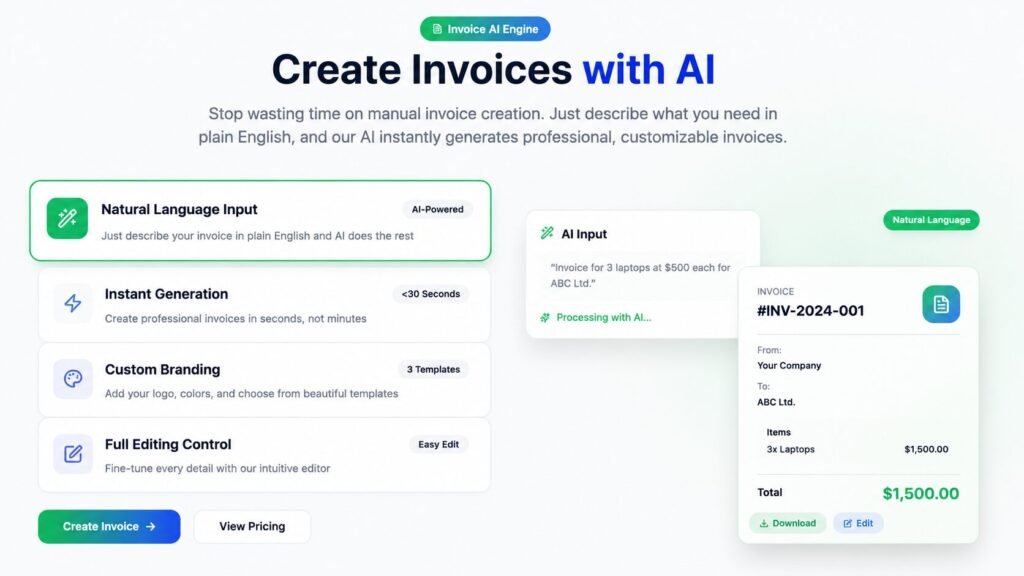
You can:
- Generate Invoices from Prompts: Tell the AI what you did, and it builds the doc.
- Build from Data: Use your bank statement or transaction data to populate invoice fields.
- Automatic Formatting: No more messing around with Word templates that look like they’re from 2005.
This broader utility helps Spendify feel like a complete financial workflow tool. It’s part of a growing trend of Digital products & services that are consolidating multiple apps into one “super-tool.”
Mastering Your Cash Flow: The Power of Spendify’s Category Analysis
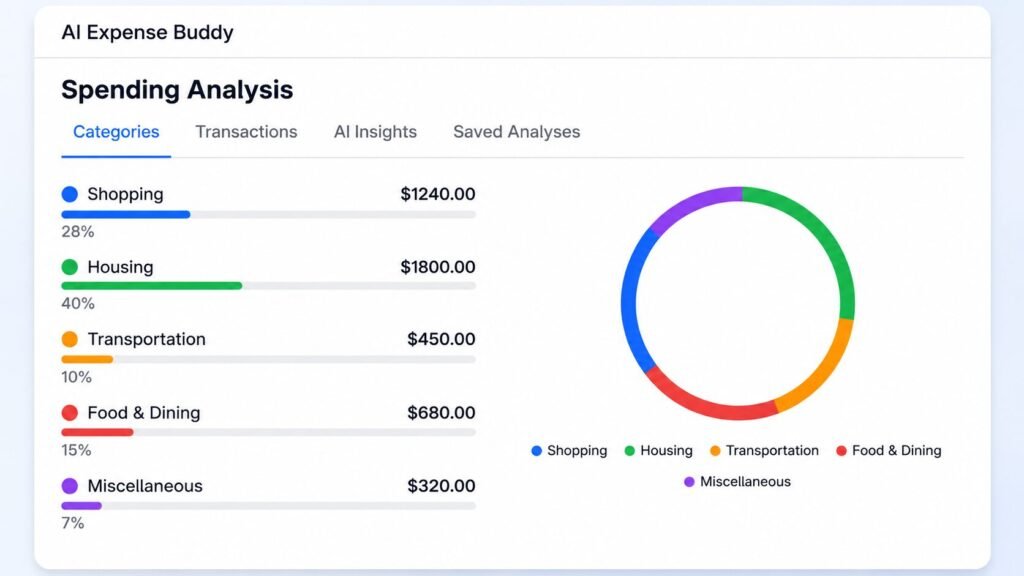
If you’ve ever stared at your bank balance wondering where the “leak” is, Spendify 2.0’s Category Analysis is your new best friend. This isn’t just a boring list of numbers; it’s a high-level visual breakdown that turns your transaction history into a colorful, interactive spending map. By using advanced AI to group your costs, the tool shows you exactly what percentage of your income is going toward essentials like Housing ($1800.00 or 40%) versus discretionary spending like Shopping ($1240.00 or 28%). For freelancers and small business owners, this visibility is a massive “W” because it highlights areas for optimization instantly—whether that’s cutting back on Transportation ($450.00) or keeping an eye on Food & Dining ($680.00). Instead of playing a guessing game, you get interactive charts and clean datasets that make budget planning feel like a win rather than a chore. If you’re ready for professional-grade financial intelligence, this visual dashboard is the ultimate way to stay organized and proactive with your money in 2026.
Ditch the Detective Work: Spendify’s Crystal Clear Transaction Browser
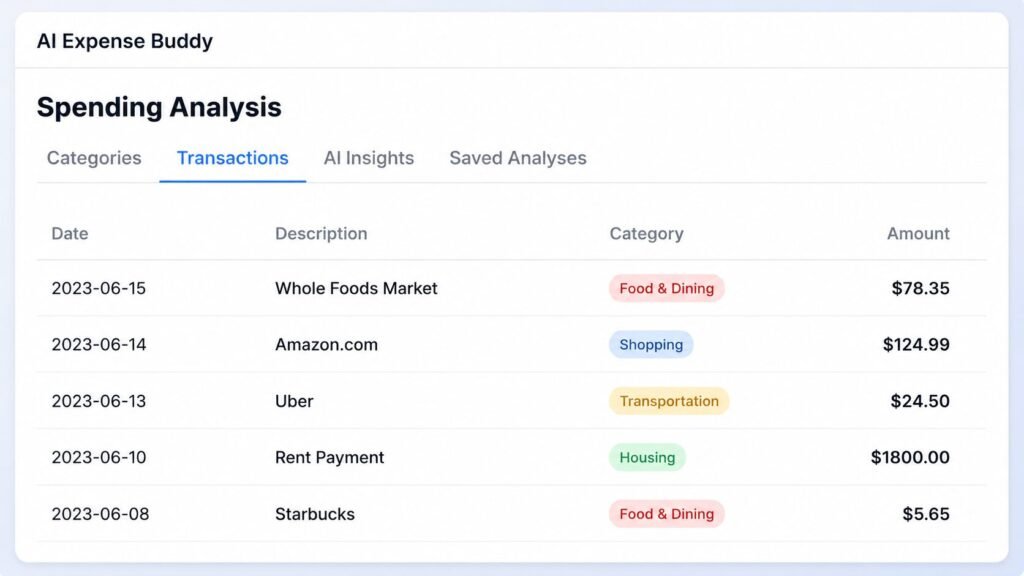
One of the biggest headaches of financial management is scrolling through cryptic bank portals trying to figure out what a charge actually was. Spendify 2.0 solves this with its Transactions browser, a feature designed to turn your messy statement history into a clean, searchable database. As seen in the “Spending Analysis” interface, the tool automatically extracts and organizes vital data—Date, Description, Category, and Amount—so you never have to play detective again. Whether you’re looking at a $78.35 trip to Whole Foods Market or a $124.99 purchase from Amazon.com, everything is labeled with high-visibility tags like “Food & Dining” or “Shopping” for instant recognition.
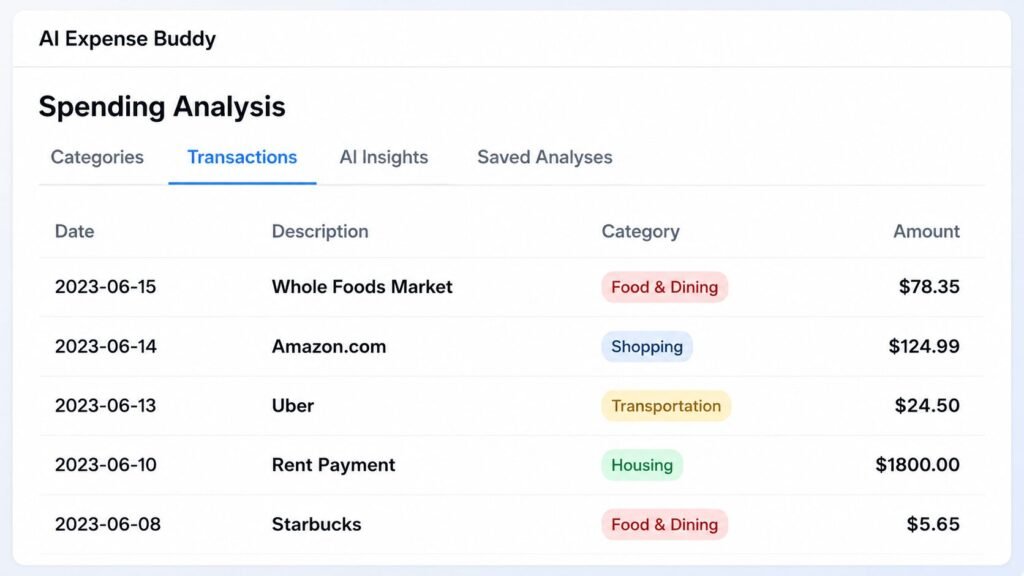
This isn’t just about listing charges; it’s about browsing and filtering your history with zero friction. For busy professionals, seeing your $1,800.00 Rent Payment alongside smaller daily expenses like a $5.65 Starbucks run in one unified view makes tracking your burn rate incredibly simple. By automating the extraction of merchant names and transaction categories, Spendify 2.0 removes the tedious manual labor of admin work, giving you more time to focus on growing your business. If you want a smarter way to audit your spending habits, this organized transaction history is a massive “W” for your financial workflow.
Top Merchants: Identifying the “Heavy Hitters” in Your Budget
If you want to plug the leaks in your cash flow, you have to look at the who behind the how much. Spendify 2.0’s Top Merchants feature—found within the comprehensive Spending Analysis dashboard—is a game-changer for vendor management. Instead of digging through endless PDF lines, the AI automatically aggregates your data to reveal where you spend the most. As seen in the example, the tool makes it easy to spot your top vendors at a glance, such as a $1,200 spend on Amazon.com, $450 for Uber transportation, and $300 at Whole Foods Market.
This level of merchant intelligence is crucial for tracking spending habits by store or service over time. For the modern freelancer or small business owner, seeing these totals clearly laid out provides the perfect “wait a second” moment—allowing you to audit recurring vendor costs, negotiate better rates, or simply scale back on high-frequency habits. It’s about moving beyond basic tracking and getting into true merchant analytics so you can keep your overhead lean and your profit margins wide.
Merchant Analytics: The “Deep Dive” Your Business Actually Needs
If you want to stop the “death by a thousand cuts” in your budget, you need to go beyond broad categories and look at merchant-level patterns. Spendify 2.0’s Merchant Analytics is where the real auditing happens. As shown in Merchant-Analytics.webp, this feature allows you to visualize the frequency, total spend, and long-term trends for every single vendor you interact with. The dashboard features two high-impact visuals: a Top Merchants by Spend donut chart—identifying heavy hitters like Amazon.com, Uber, and Whole Foods Market—and a Merchant Transaction Frequency bar chart that tracks how often you’re actually hitting these stores.
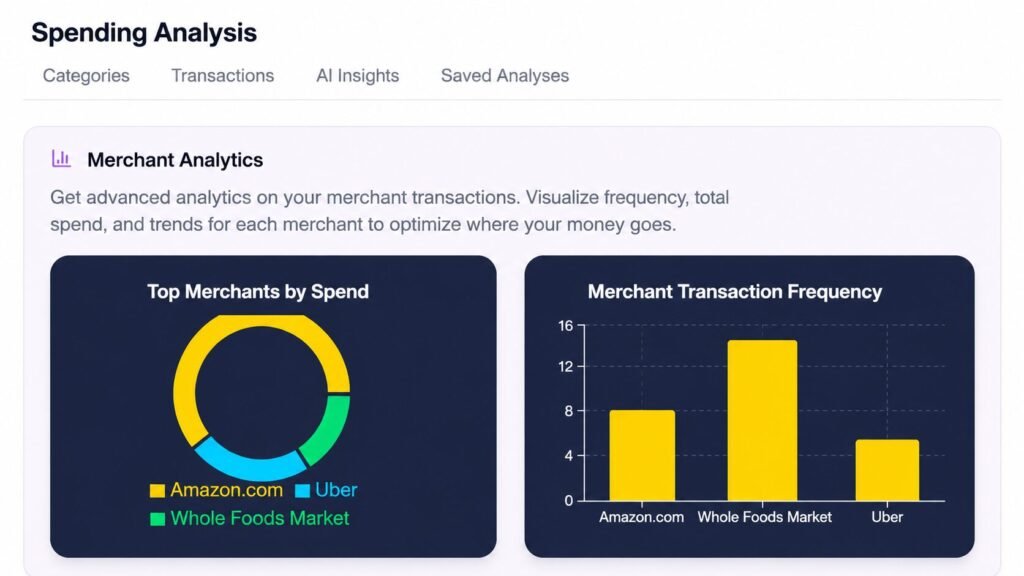
For a digital entrepreneur, this data is “straight gas.” It’s one thing to know you spent $500 on “Shopping,” but it’s another thing to see that you hit Amazon.com fifteen times in a single month. This level of granular detail allows you to identify habits you didn’t even know you had, making it easy to optimize where your money goes and cut unnecessary overhead. By moving from simple tracking to advanced merchant analytics, Spendify 2.0 gives you the professional-grade intelligence needed to keep your profit margins healthy and your cash flow crystal clear in 2026.
AI Insights: Turning Raw Data into a Personalized Financial Roadmap
If you’ve ever wanted a financial coach in your pocket without the steep hourly fee, the AI Insights tab in Spendify 2.0 is where the magic happens. This feature takes the “story” behind your transactions and translates it into actionable intelligence. For instance, as seen in the dashboard, the AI acts as a reality check by flagging that your housing expenses currently account for 40% of your total spending—significantly higher than the typical 30% recommendation for a healthy budget.
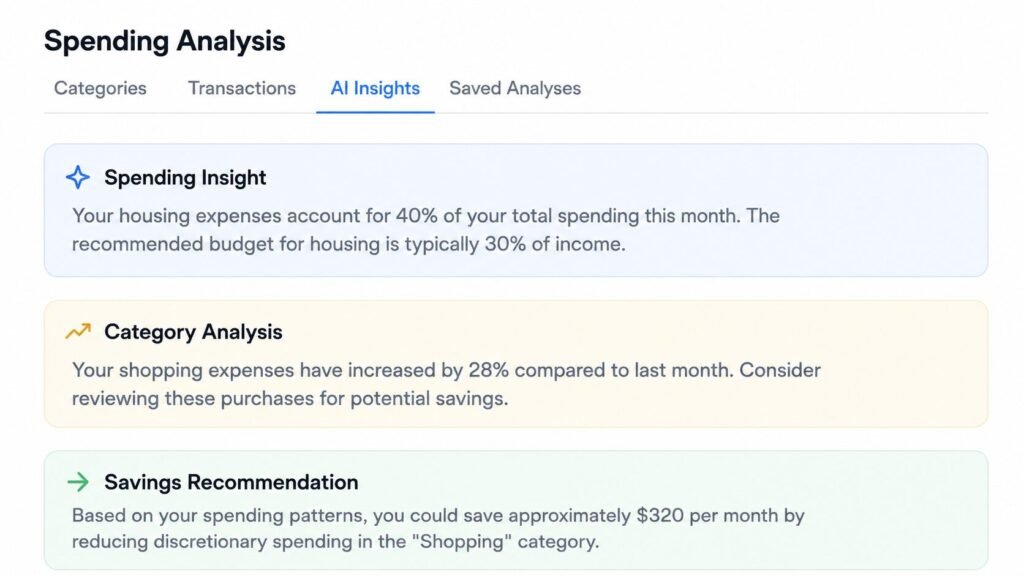
It doesn’t just stop at identifying the problem; it provides a granular Category Analysis to show you exactly where the “creep” is happening. In this example, the AI highlights that shopping expenses have surged by 28% compared to the previous month. By identifying these specific spending patterns, Spendify delivers a concrete Savings Recommendation, such as finding an extra $320 per month just by reducing discretionary spending in that high-growth shopping category. For any freelancer or small business owner, having these automated financial insights is a massive “W” that turns a chaotic bank statement into a clear, optimized plan for the future.
Saved Analyses: Your Personal Financial Time Machine
One of the biggest mistakes in money management is looking at your data once and then letting it disappear into a digital drawer. The Saved Analyses feature in Spendify 2.0 acts as your historical archive, allowing you to access and compare your past financial insights whenever you need them. As shown in Saved-Analyses.webp, the dashboard provides a clean, chronological look at your previous performance. For example, you can instantly track your progress and spending ratios across April 2023 ($4,980 / $4,210), May 2023 ($5,120 / $4,380), and June 2023 ($5,240 / $4,490).
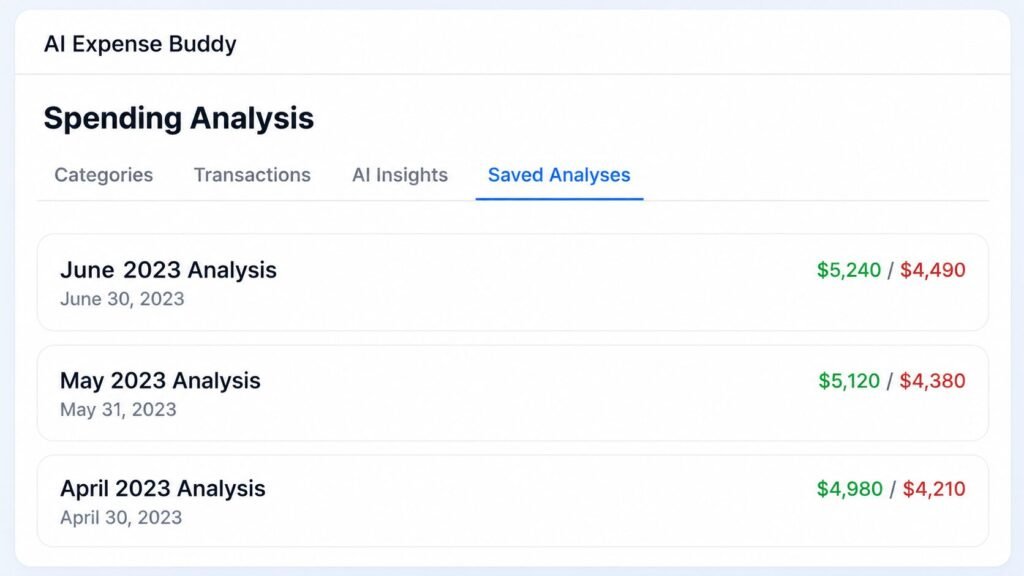
This isn’t just about keeping records; it’s about seeing the actual trendlines of your business or personal life without the headache of re-uploading and re-processing old bank statements. For any busy professional or side hustler, having this historical library of structured data is a massive “W” for long-term planning and year-over-year comparisons. It turns a one-off analysis into a long-term strategy, giving you the clarity to make smarter financial moves in 2026.
Frictionless Financial Data: Uploading Statements to Spendify
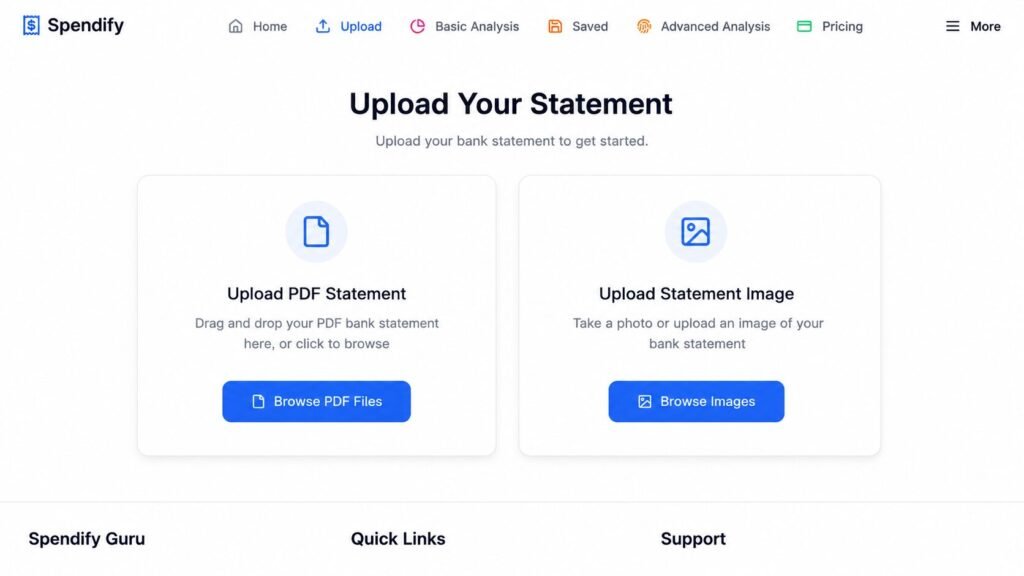
Let’s be real: nobody actually enjoys the manual data entry that comes with tracking expenses. Spendify 2.0 solves this by making the “upload” phase of your financial analysis completely painless. As you can see in the Upload Your Statement dashboard, the tool offers two simple ways to feed your financial data into the AI engine. You can Upload PDF Statements by simply dragging and dropping your files or clicking to browse your computer. If you’re more of a mobile user, the Upload Statement Image option is a total life-saver—you can literally take a photo of a physical statement or upload a screenshot directly. Once you hit “Browse PDF Files” or “Browse Images,” the Spendify Guru takes over, and as the notification in the corner confirms, your “AI analysis of your statement is complete” before you even have time to reach for your coffee. It’s a fast, modern, and high-visibility way to get your finances organized without the “spreadsheet scaries.”
Charts & Visualizations: Seeing the Story Behind Your Spending
If you’re the type of person who gets a headache looking at rows of raw numbers, Spendify 2.0’s Charts & Visualizations are about to be your new favorite thing. As you can see in the Top Merchants Analysis dashboard, the tool transforms your bank data into a high-definition financial map. By using a variety of interactive formats—like the Donut Chart for a quick share-of-wallet view, a Line Chart to track totalSpent against frequency, and Bar or Area Charts for side-by-side comparisons—you can instantly spot the trends that matter.
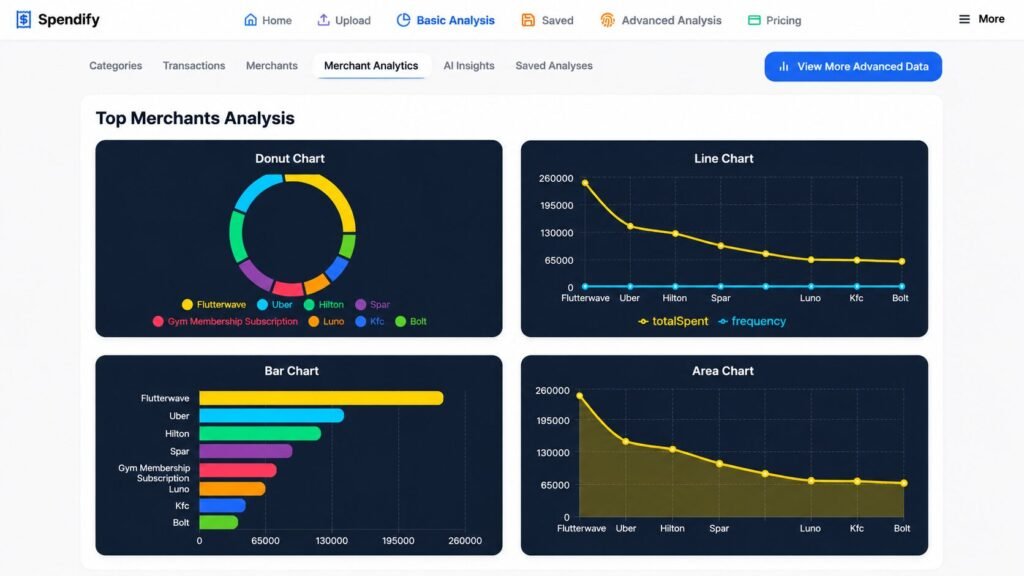
Whether you’re looking at your heavy hitters like Flutterwave and Uber or monitoring recurring costs from Hilton, Spar, and KFC, these visuals make it impossible for expenses to hide. For any entrepreneur or freelancer, this isn’t just about pretty pictures; it’s about advanced financial intelligence. Being able to toggle between merchant analytics and AI insights within the same interface allows you to understand exactly where your capital is going so you can optimize your overhead in real-time. It’s a massive “W” for anyone who wants to ditch the spreadsheets and start managing their money with professional-grade clarity.
Spendify Expense Tracker: Mastering Your Monthly Burn Rate
Let’s face it: staying under budget is nearly impossible if you’re only looking at your bank balance once a week. The Spendify Expense Tracker is designed to give you that much-needed reality check in real-time. As you can see in the dashboard, the interface provides a high-level overview of your Monthly Spending alongside a precise Monthly Budget comparison. It doesn’t just show you numbers; it calculates the exact percentage of your budget used, so you know exactly when to pump the brakes.
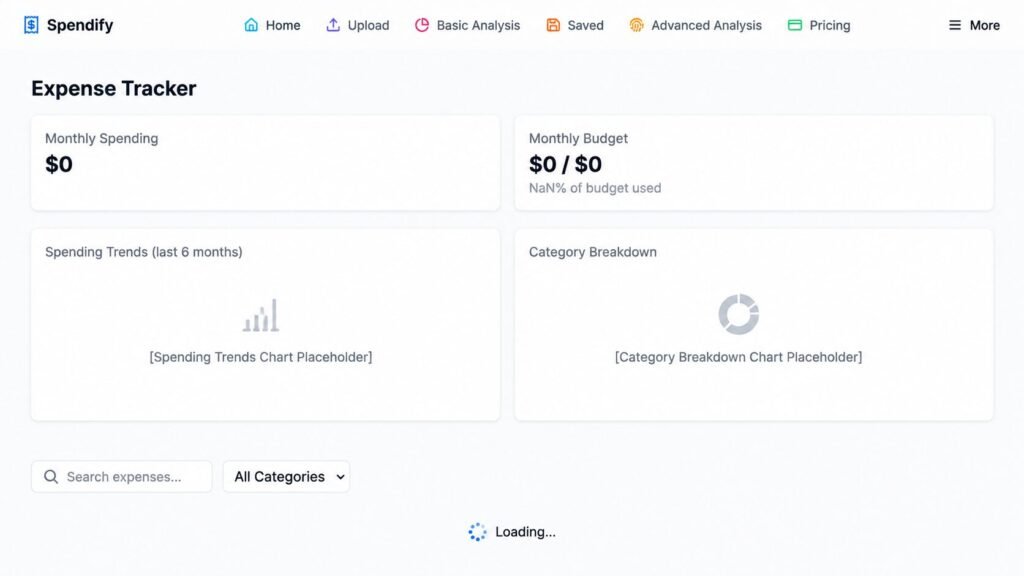
For the data-driven professional, this feature goes deeper with a Spending Trends view covering the last six months and a detailed Category Breakdown. Whether you need to search for a specific transaction or filter by category, the layout is built for speed and clarity. By automating the tracking process, Spendify helps you move away from reactive “bank statement stress” and into proactive financial management. It’s a massive “W” for anyone looking to maintain a lean overhead and hit their savings goals with professional-grade precision in 2026.
Export Reports: Professional Portability for Your Financial Data
When it’s time for tax season or a deep-dive strategy session with your CPA, you need more than just a digital dashboard—you need portable, professional data. Spendify 2.0’s Export Report feature is built for exactly this level of offline utility. As showcased in the Scam Alerts & Security interface, the platform provides a seamless Export dropdown that allows you to download your critical financial records in high-versatility formats like CSV or JSON.
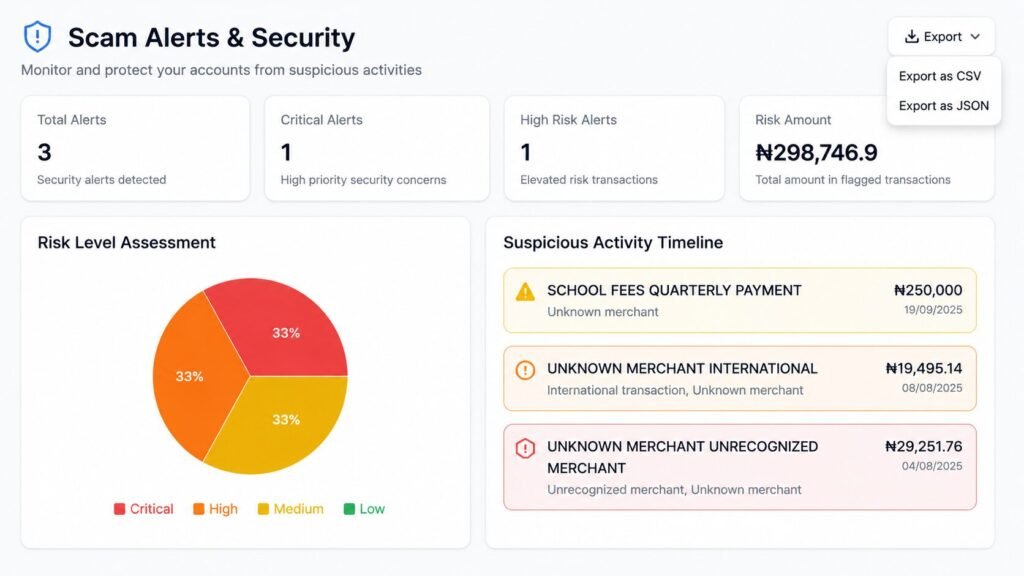
This functionality is a massive “W” for digital entrepreneurs who need to move their “AI-cleansed” data into other accounting software or custom spreadsheets. Whether you’re documenting Risk Level Assessments or saving a Suspicious Activity Timeline for your records, the ability to take your insights offline ensures you have total control over your financial narrative. By offering easy downloading of reports and statements, Spendify 2.0 bridges the gap between smart AI analysis and the practical, day-to-day needs of running a business with 100% clarity.
Spendify’s AI-Powered Engine: The Future of Smarter Money Management
In the 2026 financial landscape, simply tracking your expenses isn’t enough; you need a system that thinks alongside you. Spendify 2.0’s suite of AI-Powered Features is designed to transform you from a passive observer into a strategic investor of your own capital. At the core is the AI-Powered Analysis, which acts as a digital forensic accountant to detect deep-seated spending patterns and deliver actionable insights you’d normally miss in a standard spreadsheet. As seen in the AI-Powered Insights dashboard, the tool provides high-visibility “reality checks,” such as flagging a Spending Opportunity when expenses exceed income or offering a Savings Recommendation to help you hit that gold-standard 20% savings rate.
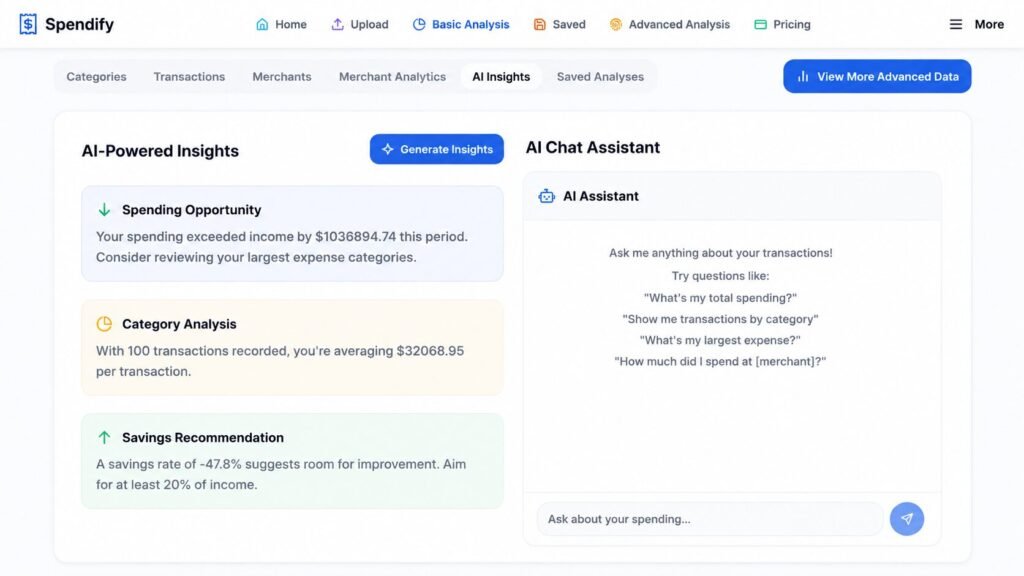
The experience is anchored by Interactive Dashboards that visualize your finances through smart, dynamic charts, making Performance Tracking and goal progress feel intuitive rather than intimidating. With Smart Categorization, the adaptive AI auto-sorts every transaction—from high-level business overhead to small daily coffee runs—averaging out costs so you can see exactly where your Category Analysis stands. Perhaps the most “human” element is the AI Chat Assistant, which allows you to ask natural questions like “What’s my largest expense?” to get Personalized Insights instantly. Backed by enterprise-grade security to keep your data secure and private, Spendify 2.0 isn’t just a tool; it’s a comprehensive financial intelligence hub built for the modern entrepreneur.
Advanced Analytical Features: Your AI Financial Security Guard
If you want to move beyond basic budgeting and into professional-grade wealth management, Spendify 2.0’s advanced analytical suite is where the real work gets done. The standout feature for many in 2026 is the Scam Alerts system, which provides real-time detection and prevention of suspicious activities, giving you an essential layer of security in an increasingly digital world. By monitoring your Suspicious Activity Timeline, the AI flags unknown or unrecognized merchants before they can drain your accounts. This proactive approach pairs perfectly with the Subscription Manager 2.0, which helps you track and manage Recurring Expenses effortlessly, ensuring you never get hit with another “ghost” renewal fee.
For the serious entrepreneur or freelancer, the Cash Flow monitoring and Merchant Insights tools allow for total control over income and expenses across various vendors. You can even evaluate your overall “health” via a personalized Financial Score, giving you a high-level metric for your wellness. Perhaps the biggest time-saver during tax season is the Tax Categorization feature; it leverages automated expense tracking to simplify tax preparation, turning a month-long headache into a few clicks of an Export Report. With these tools, Spendify 2.0 doesn’t just track your money—it audits and protects it with elite financial intelligence.
Plans and Pricing: Which One is Clutch?
DealFuel currently has three main tiers for Spendify 2.0. Here is the breakdown so you can pick the one that fits your vibe.
| Plan | Price (DealFuel) | Best For | Key Features |
| Basic Plan | $39 (was $99) | Casual users / Personal budgeting | 50 statements/mo, 10 saved analyses, AI categorization. |
| Premium Plan | $89 (was $199) | Heavier users / Side hustlers | 200 statements/mo, 50 saved analyses, 10 AI Advisor queries. |
| Ultimate / MAX | $299 (was $499) | Power users / Business owners | Unlimited uploads & AI queries, Priority support, Custom categories. |
The Verdict on Value
If you are running a business or multiple side hustles, the MAX Plan is the clear winner. The “unlimited” factor means you never have to worry about hitting a wall in the middle of a tax audit or a major financial review. However, if you just want to get your personal finances “straight gas” for the year, the Premium Plan offers plenty of horsepower.
My Self-Test Style Review: The Raw Truth
I don’t just read the sales pages; I like to see where these tools actually break. Here is my honest read after putting Spendify 2.0 through the “vibe check.”
The “W”s (Wins)
- Privacy-First Vibe: One of the biggest wins is that you don’t have to link your bank account. In an era of constant data breaches, being able to just upload a PDF and get insights without giving away your login credentials is a massive “W.”
- Parsing Speed: The AI is fast. Like, “don’t even have time to check Twitter” fast. It handles complex PDF layouts that usually make other parsers cry.
- Actionable Insights: It doesn’t just give you a graph; it gives you “AI Insights” that actually tell you what to do (e.g., “You’re spending 20% more on dining this month compared to your 6-month average”).
The “L”s (Losses)
- Initial Setup: While the AI does the heavy lifting, you still have to spend some time “teaching” it your specific quirks during the first few uploads.
- Category Logic: Like any AI, it sometimes gets a weird local merchant wrong. You’ll need to do a quick “sanity check” to make sure your local bodega isn’t being categorized as “International Travel.”
- Mobile Experience: The dashboard is clearly optimized for desktop. It works on mobile, but if you want to really dive into the charts, you’ll want a bigger screen.
Who Spendify Is Best For (and Who Should Skip)
🎯 Who Should Buy It:
- The “Spreadsheet Hater”: If the thought of opening Excel makes you want to nap, Spendify is for you.
- The Multi-Hustler: If you have money moving through 10 different places, this will save your sanity.
- The “Zombie Subscription” Victim: If you know you’re wasting money on subs but don’t have the energy to find them all.
- Students & Self-Improvers: If you’re managing tight budgets while using tools like ScholarshipOwl Review 2026 — Strengths, Drawbacks & Better Alternatives or learning new skills with Guitar Learning Evolution 2026 Review: Is This the Fastest Way to Learn Guitar?, Spendify helps you track every dollar of that investment.
⚠️ Who Should Be Careful:
- The “One-Card” Spender: If you only have one debit card and you’re already super disciplined, this might be overkill.
- The Full-Scale Accountant: If you’re looking for a tool that does full double-entry bookkeeping, payroll, and tax filing for a 50-person company, Spendify is an analysis tool, not a full accounting suite replacement.
Practical Ways to Use Spendify (The Workflow)
If you decide to pull the trigger on this DealFuel offer, here is how I recommend using it to get the most “SEO-friendly” (Searching Every Option) value out of it:
- The “6-Month Scrub”: Don’t just upload last month. Download the last 6 months of statements from your two biggest accounts. Upload them all at once using the Multi-Statement Merge. This gives the AI enough data to actually see your “real” life.
- The Subscription Audit: Go straight to the Subscription Manager 2.0. Look for anything under $15 that you don’t recognize. These are the “silent killers” of your bank balance.
- The AI Advisor Session: Once your data is in, use the AI Financial Advisor. Ask it: “What are my top 3 areas of wasted spending?” The answer is usually something you hadn’t even considered.
- The Forward Forecast: Look at your 3-month projection. If it looks “mid,” use the AI Budget Builder to adjust your allocations today so you’re “straight gas” by next quarter.
This tool is especially useful when paired with other business services. For example, if you’re operating internationally or looking to optimize your tax setup, checking your finances in Spendify while reading our Business Anywhere Tax Residency Review 2026: Is the Consultation Worth It? will give you a complete picture of your global financial health.
2026 Comparison: Spendify 2.0 vs. The “Big Names”
| App | Best For | The “AI” Factor | Business Workflow | Pricing Model |
| Spendify 2.0 | Digital Entrepreneurs & Firms | High. Full statement parsing & predictive analysis. | Built-in. Invoicing + Multi-entity merging. | Lifetime Deal (DealFuel) |
| Monarch Money | Couples & Net Worth | Medium. Basic categorization and syncing. | Personal focus; lacks invoicing. | Monthly/Annual Subscription |
| Rocket Money | Subscription Cancellers | Medium. Negotiates bills on your behalf. | Mostly personal; limited business utility. | Monthly Subscription |
| YNAB | Proactive Budgeters | Low. Relies on a strict manual “methodology.” | High friction for busy entrepreneurs. | Monthly Subscription |
| Empower | Portfolio Tracking | Low. Investment-heavy, not statement-heavy. | No invoicing or budget building. | Free (with upsells) |
| Tiller | Spreadsheet Enthusiasts | None. Just feeds data into Sheets/Excel. | High manual work; no built-in AI. |
Final Verdict: Is Spendify 2.0 Worth the Hype?
1. It Doesn’t Just Sync—It “Thinks”
Most apps (Monarch, Rocket Money) rely on Plaid or Yodlee to sync your bank account. That’s fine until the connection breaks or your bank requires 2FA every three days. Spendify 2.0 uses AI Full Parse to read your actual bank statements. It’s like giving a stack of paperwork to a genius intern who returns a perfectly organized report 10 seconds later.
2. The “Multi-Entity” Secret Weapon
Most personal finance apps freak out if you try to manage three different side hustles and a personal account in one place. Spendify’s Multi-Statement Merge allows you to blend data from different accounts or even different companies. For our firm, being able to see a unified view of “Software Spend” across three different ventures is a game-changer that YNAB or Rocket Money simply can’t match.
3. Subscription Management on Steroids
Rocket Money is famous for finding subscriptions, but Spendify 2.0 Subscription Manager 2.0 actually analyzes price creep. It doesn’t just say “You pay for Adobe”; it tells you “Adobe increased by $5 this month.” In a world where SaaS companies sneak in price hikes every quarter, this feature alone pays for the tool.
4. The “Anti-Subscription” Pricing
Let’s be real: we are all tired of “Death by 1,000 Subscriptions.” Most of these alternatives want $10–$20 every single month forever. Spendify 2.0’s availability as a lifetime deal through DealFuel means you pay once and own your financial intelligence. For a business owner, removing a recurring monthly cost while gaining a tool that tracks other recurring costs is a massive win.
The Verdict: Why Spendify 2.0 is the Clarity Winner
While Monarch is a beautiful choice for couples and YNAB remains the gold standard for those who want to manually account for every single cent, Spendify 2.0 is the clear winner for the busy professional.
It successfully bridges the gap between “messy bank statements” and “professional business intelligence.” This is the only tool I’ve tested that feels like it was actually built for people who have a business to run—not for people who want to spend their entire Sunday afternoon trapped in a spreadsheet.
The Bottom Line: If you’re ready to stop playing detective with your own bank statements and start making actual data-backed decisions, Spendify 2.0 is the 2026 frontrunner.
Our firm sees this as a solution to a very real, very annoying problem: Financial Fragmentation. The old-school way of tracking money is officially dead. Between multiple apps, cards, and accounts, you need an engine that can centralize the chaos. Based on the performance of the AI Full Parse engine, this tool is a massive “W” for anyone who wants total visibility without the manual labor.
Is it magic? No. It won’t magically put money into your bank account. But it will show you exactly where your money is going and, more importantly, how to keep more of it. It’s practical, modern, and perfectly calibrated for the 2026 hustle.
One final piece of advice: While we’re on the subject of financial clarity, always stay vigilant about where you’re putting your data. Before you dive into any new digital marketplace, check out our [EveryMarket Review: Is It a Scam? The 2026 Truth Exposed!] to keep your wallet and your information safe.
My final take? Spendify 2.0 is straight gas. It’s the smarter, AI-driven way to manage your cash flow. If you’re tired of the noise and ready for the clarity, this is the move.
Whether you’re a freelancer building for clients or a creator scaling your own brand, the DealFuel Extended Commercial License is designed to give you plenty of room to grow. Here is the plain-English breakdown of what’s allowed and where the boundaries are.
Fonts: Bringing Your Text to Life
The “Yes” List:
- Client Work: Feel free to use these fonts in both personal and commercial projects for your clients.
- Branding & Media: You can use them for social media profiles, websites, custom logos, and e-books.
- Merchandise: Use the fonts to create quotes or phrases for physical products like t-shirts, mugs, and bags.
- Print-On-Demand (POD): You can sell flattened designs on POD sites, provided the actual font file is never uploaded.
- Video Content: Use them in media productions as long as views stay under 1,000,000 per month.
The Dealbreakers:
- Digital Tools: You cannot create digital alphabets, stencils, or logo templates for resale.
- Embedding: Do not embed font files into apps or POD sites where others can use them.
- Alphabet Products: You can’t sell products that consist only of the font’s letters.
- Sharing: No reselling, giving away, or redistributing the original font files.
Vectors & Illustrations: Remixed for Success
The “Yes” List:
- Original Designs: You can create original work where the resource isn’t the “main event” or a significant part of the design.
- Mixed Media: Use your original designs on physical or digital products and POD sites (flattened only).
- View Limits: Video use is allowed up to 1,000,000 views per month.
- Showcasing: Mockup templates are fair game to show off your original work.
The Dealbreakers:
- “As-Is” Sales: You cannot sell the graphics exactly as they are on POD sites.
- Dismantling: Do not break up bundles or graphics to resell individual pieces.
- Embedding: Unmodified graphics cannot be embedded into software or third-party sites.
- Logo Rules: Don’t use a graphic as the primary part of a logo without making significant design changes.
- Extraction: You cannot allow third parties to extract individual elements from the product.
Addons: Overlays, Presets, and Scripts
The “Yes” List:
- Unlimited Scale: Use these addons for an unlimited number of personal or commercial client projects.
- End Products: There is no limit on how many end products you can sell using these tools.
The Dealbreakers:
- No Sharing: You can’t redistribute the files or upload them to sites where non-licensed users can create designs.
T-Shirt Designs: Wear Your Creativity
The “Yes” List:
- Commercial Sales: Print the designs on T-shirts, mugs, mousepads, or calendars for sale.
- Showcasing: You can display the designs on your website to drive sales.
- Creative Freedom: Feel free to modify, manipulate, or combine these designs with other work to make them yours.
The Dealbreakers:
- Restricted Uploads: Don’t upload these to websites that allow other users to tweak the designs for their own merchandise.
Web Templates: Building the Digital World
The “Yes” List:
- Flexible Builds: Create unlimited end products for yourself or your paying clients.
- Total Control: You are allowed to modify or combine the template with other works to create something new.
The Dealbreakers:
- Resale Prohibited: You cannot resell or redistribute the template itself.
- No “Create-Your-Own” Sites: You can’t use these templates on POD or “DIY” sites where other users customize the product.
The “No-Gatekeeping” Guide to Spendify 2.0: Your FAQ Refresher
I know, I know—reading through fine print is nobody’s idea of a good time. But if you’re looking to get your financial life in order with Spendify 2.0, you’ll want to know how the gears turn. Here is the lowdown on the deal terms, written in plain English so you can get back to actually managing your money.
Getting Up and Running
- Activation Process: Once you finish your purchase, keep an eye on your inbox for an instructions document. Just follow the steps in that PDF to redeem your coupon code and flip the switch on your subscription.
- The “Use It or Lose It” Window: You have exactly 30 days from your purchase date to redeem your coupon code. Don’t let it gather digital dust!
The “Lifetime” Lowdown
- Is it really for life? Yes, a Lifetime Subscription is available.
- The Fine Print: In the tech world, “Lifetime” means the lifetime of the product. Many of these deals come from scrappy startups. While we hope they stay around forever, if the product is acquired or hits a rough patch, DealFuel can’t really step in to save the day—that’s just the nature of the startup game.
Support & Success
- Free Updates: You won’t be stuck on an old version. Updates for Spendify 2.0 are provided completely free of charge.
- Need a Hand? If things get wonky, you’ve got access to free support. Just reach out to the pros at support@spendify.com.
Who Can Use This?
- Eligibility: This specific deal is reserved for NEW users of Spendify 2.0.
- User Limits: One coupon code is good for one user or account.
- Stacking Codes: Good news for the power users—the coupon codes are stackable.
Access Anywhere
- Device Compatibility: Whether you’re on your laptop at a coffee shop or checking your phone on the go, you can access Spendify 2.0. It works on all devices as long as you have a stable internet connection.
Do I have to link my bank account?
No cap, you don’t. You can just upload statements (PDF/CSV) manually, which is a huge win for privacy.
Does it work with international banks?
Yes, the AI is designed to normalize data across different banks, formats, and even currencies.
Is the MAX Plan really “Unlimited”?
According to the DealFuel offer, yes. Unlimited statements, unlimited AI queries, and unlimited saved analyses. It’s built for the power users.
Can I use it for my business and personal accounts separately?
Definitely. You can use the multi-statement merge to keep them separate or see them together for a “total life” view.
What are the top 5 budgeting apps in 2026?
The current market leaders are generally categorized by how they handle your money:
- Monarch Money: Best for couples and all-in-one net worth tracking.
- Spendify 2.0: Best for digital entrepreneurs and anyone needing AI-driven statement analysis.
- YNAB (You Need A Budget): Best for strict, proactive “zero-based” budgeting.
- Rocket Money: Best for finding and canceling forgotten subscriptions.
- Empower: Best for high-level investment and portfolio monitoring.
What is the best free app for expense tracking?
If “free” is your primary goal, Empower (formerly Personal Capital) remains the heavy hitter. It offers great automated tracking and net worth visuals for $0. However, most free apps make their money by selling you financial products. If you want a professional-grade tool without a recurring monthly bill, many entrepreneurs are opting for the Spendify 2.0 lifetime deal—you pay once and avoid the “subscription creep” typical of apps like Monarch or Rocket Money.
Why is Monarch Money so good, and how does it differ from EveryDollar?
Monarch Money is praised for its beautiful UI and its ability to handle “syncing” across hundreds of institutions seamlessly. It’s built for modern users who want a “set it and forget it” overview.
EveryDollar, on the other hand, is the Dave Ramsey-recommended app. It’s built on the “envelope system” and focuses on the psychology of spending. It’s much more manual by design.
- Where Spendify fits: Spendify 2.0 bridges this gap. It gives you the automation of Monarch but uses AI parsing (instead of just bank syncing) to give you the deep, line-item intelligence that EveryDollar users often look for.
What are the best Spendee alternatives for 2026?
Spendee users usually love the “shared wallet” and “multi-currency” features. If you’re looking to move on from Spendee, Spendify 2.0 is the top modern alternative because its AI handles multi-currency and multi-bank statements far more efficiently, especially for those of us running international digital businesses.
Is Spendify 2.0 better than the apps reviewed by NerdWallet or Reddit?
NerdWallet often highlights “legacy” apps with massive user bases like Quicken or Rocket Money. However, if you check Reddit (r/Entrepreneur or r/SideHustle), the conversation in 2026 has shifted toward “Agentic AI.”
Reddit users are increasingly recommending Spendify 2.0 because it solves the “broken sync” problem. While NerdWallet picks might struggle when a bank connection drops, Spendify users just upload their PDF statements and the AI does the rest. It’s a more “fail-proof” workflow for busy professionals.
What budgeting software does Dave Ramsey recommend?
Dave Ramsey still points his followers toward EveryDollar. It’s perfect if you are focused on the “Baby Steps” and getting out of consumer debt. However, if you’ve moved past the debt-payoff phase and you’re now in the “wealth building and business growth” phase, you’ll likely find EveryDollar too limited. That’s when a tool like Spendify 2.0—which analyzes cash flow and business trends—becomes the smarter choice.
The Verdict: Why Spendify 2.0 is Winning the Search
The reason you see so many people searching for “Spendify 2.0 alternatives” is because people are finally realizing that bank syncing isn’t enough. You need a tool that actually understands the data. Whether you’re moving away from Spendee or looking for a more powerful version of Monarch, Spendify 2.0 is the only tool designed to turn “financial noise” into “business clarity.”
Ready to stop the spreadsheet fatigue? Check out the latest Spendify 2.0 deals and join the AI finance revolution.
Contact Supplier
- Customer Support: support@dealfuel.com
- Deal Submissions: deals@dealfuel.com
Financial Disclaimer: The information provided on this website is for educational and informational purposes only and should not be construed as professional financial advice. While we strive to provide accurate and up-to-date information, financial markets and product details change frequently. We strongly recommend consulting with a qualified financial advisor or a certified professional before making any significant financial decisions. You are responsible for your own financial research and decisions.
Ready to level up your digital toolset? Check out the rest of our Digital products & services reviews for more “straight gas” recommendations.
How We Review: Our Commitment to Transparency
Trust is the most important part of any product review. At Shoppy Express, we don’t just skim the spec sheet; we dive deep into real-world usability to ensure every recommendation meets our high standards for performance and value. With a background rooted in engineering, we look for structural integrity and technical efficiency—not just flashy marketing hype.
We know that choosing the right tech is a serious investment, which is why we follow a strict editorial methodology to remain unbiased and focused on what actually works. If you’re curious about the rigorous testing, selection criteria, and integrity standards we use to evaluate the gear featured on this site, feel free to explore Our Process. We believe in total transparency so you can shop with 100% confidence.
Our Disclosure
To keep our firm running, we may earn a small commission from qualifying purchases made through our links—at no extra cost to you.
- Authenticity: All product images used are sourced from original suppliers.
- Integrity: Our reviews cannot be bought; we prioritize your success over everything else.