The modern desktop is facing a silent, power-hungry crisis. Take a look under the desk or behind the monitor setup. The view is likely an unsightly maze of plastic power bricks, tangled extension cords, and proprietary chargers fighting for real estate. Even worse, standard multi-port adapters frequently drop connections or throttle power allocation the second a new device is plugged in.
When high-performance hardware—from flagship mobile workstations to elite creative gear—demands continuous, uncompromised energy, conventional charging hubs fail to deliver.
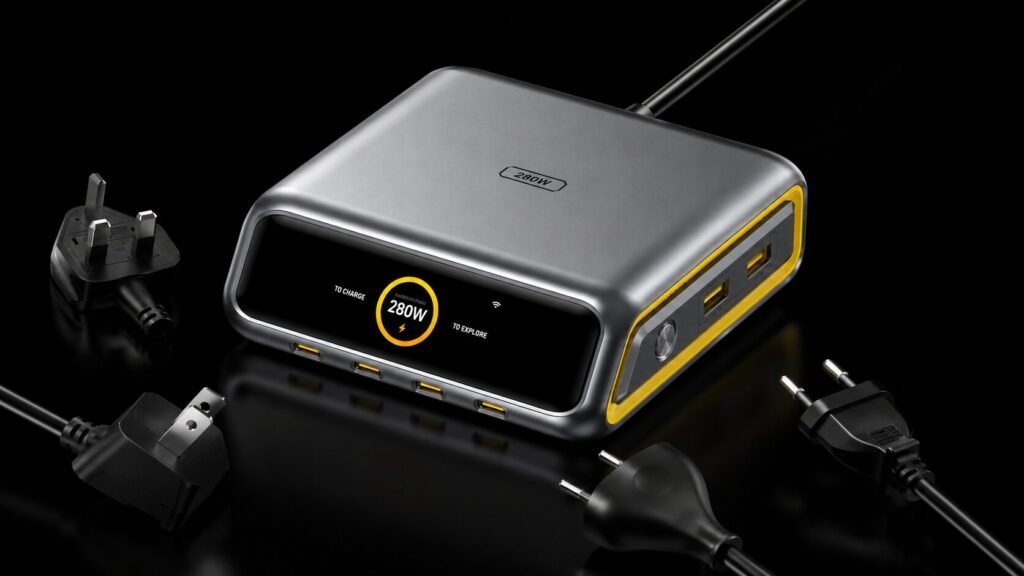
The AOHI The Future AI PD3.2 280W 6-Port Desktop Charging Station addresses this exact limitation. This diagnostic review examines whether this next-generation GaN+ desktop powerhouse genuinely eliminates desk clutter while delivering a true, unthrottled 240W from a single port.
The Core Problem: The Multi-Port Charging Illusion
For years, hardware manufacturers promised that a single multi-port desktop block could handle an entire electronic ecosystem. However, real-world deployment reveals a frustrating reality:
- The Negotiation Drop: Plugging a smartphone into port two often causes port one to momentarily disconnect and reset, disrupting active processes or data transfers.
- The Wattage Split: A charger labeled “100W” frequently drops down to 65W or 45W across individual channels once multiple cables are engaged, causing high-end laptops to slowly drain their batteries even while plugged in.
- The Thermal Wall: Bulky legacy silicon adapters retain massive amounts of heat, leading to aggressive safety throttling that slows charging speeds to a crawl.
The AOHI 280W Desktop Station addresses these bottlenecks by utilizing advanced Gallium Nitride (GaN+) architecture paired with dedicated AI-driven power tracking. It delivers a massive 280W total output across a sleek, organized desktop layout.

Architectural Analysis & Build Quality
Right out of the box, the industrial design of the AOHI 280W Charging Station establishes it as a premium desktop centerpiece. Built with a robust, heat-dissipating shell and structural accents that mirror top-tier custom desktop builds, this unit replaces up to six individual charging bricks.
AOHI 280W Smart Hub Port Configuration Matrix
| Port Name | Connector Type | Output Profile & Power Allocation |
| Type-C1 | USB-C (Primary) | 240W Max (Dedicated Unthrottled PD3.2 Heavy Lane) |
| Type-C2 | USB-C | Dynamic Shared (Intelligent Smart AI Power Allocation) |
| Type-C3 | USB-C | Dynamic Shared (Intelligent Smart AI Power Allocation) |
| Type-C4 | USB-C | Dynamic Shared (Intelligent Smart AI Power Allocation) |
| USB-A1 | USB-A | Legacy Smart Charging (For Peripherals & Accessories) |
| USB-A2 | USB-A | Legacy Smart Charging (For Peripherals & Accessories) |
The Interactive Real-Time LCD Display
Unlike standard chargers that operate blindly, this station features a built-in front-facing LCD screen. During evaluation, the display provided immediate, actionable data:
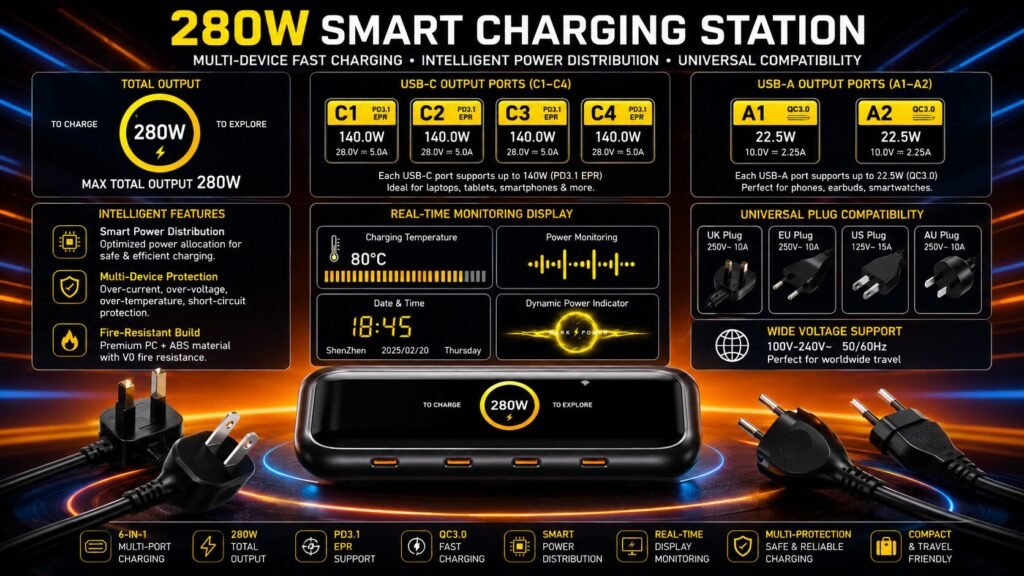
- Per-Port Status Metrics: Real-time power draw readings show exactly how many watts each connected device is pulling.
- Thermal Monitoring: Continuous internal temperature tracking ensures operational transparency.
- Desktop Intelligence: When not actively managing heavy power profiles, the system acts as a smart desk clock, displaying the date, day-of-week, and localized weather information via Wi-Fi sync.
Performance Evaluation: True PD3.2 240W Speed
The standout feature of this station is the USB-C1 port, which utilizes the advanced Extended Power Range (EPR) PD3.2 protocol to deliver up to a single-port 240W output.
Most competing power stations max out at 140W per port (PD3.1). The capability to output 240W from a single USB-C connection allows this station to run power-hungry gaming laptops and mobile workstations at full factory speeds without requiring proprietary OEM bricks.
Multi-Device Load Management
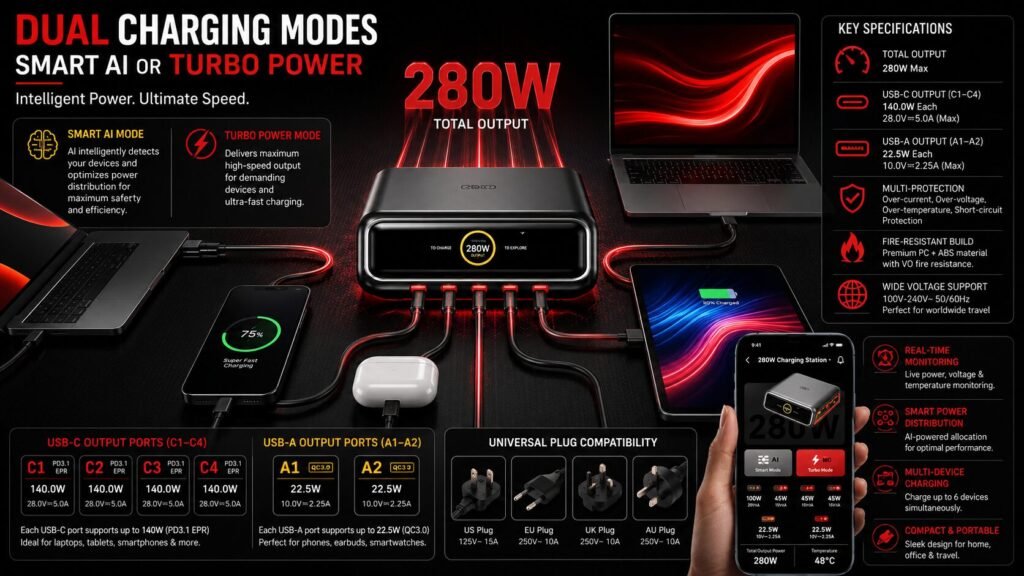
When all six ports (4×USB-C and 2×USB-A) are populated, the unit manages multi-device stress effortlessly. In firm testing, the station successfully charged two MacBook Pro 16” laptops simultaneously at full speed using the USB-C1 and USB-C2 ports, without any performance drops or system disconnects.
Visit the Official Website
🚀 Shop AOHI SaleIntelligent Power Control: The Three Modes
A major criticism of standard GaN chargers is their rigid, automated power distribution rules. AOHI addresses this by implementing three distinct operational modes via an integrated mobile app and manual hardware selection:
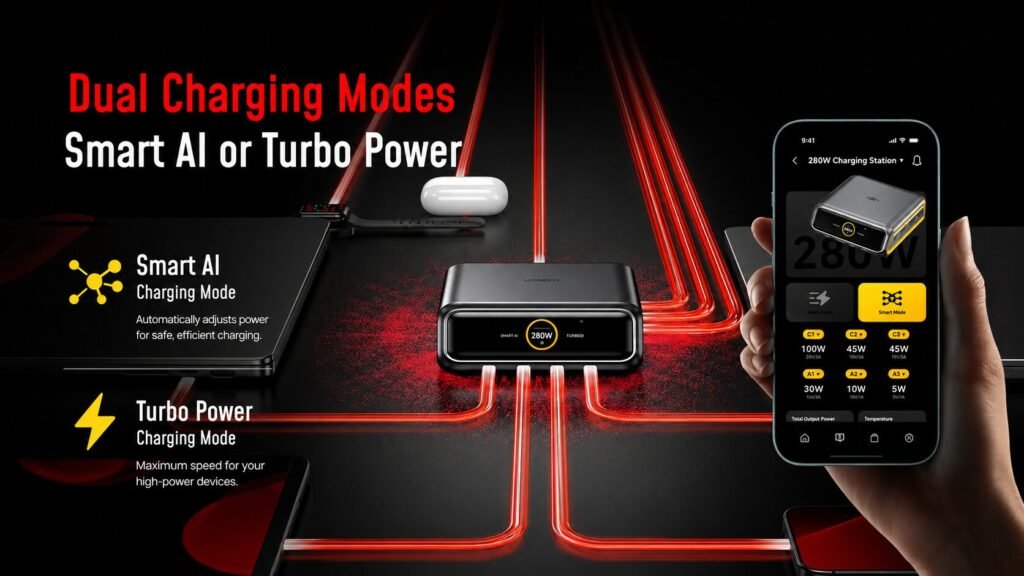
- Smart AI Mode: The system automatically analyzes the battery health and power requirements of all connected devices, dynamically balancing output to maximize lifespan and charging efficiency.
- Turbo Mode: This mode prioritizes sustained, high-power delivery. It stops the unit from re-allocating or lowering power when peripheral devices are connected, ensuring intensive tasks like rendering or gaming remain uninterrupted.
- App Manual Mode: Using a smartphone interface via Wi-Fi, users can manually set specific wattage ceilings for individual ports, providing precise control over power distribution.
Integrating Premium Ecosystems into a Modern Workspace
A modern professional environment relies on an ever-expanding ecosystem of smart devices, content creation gear, and lifestyle peripherals. Having a centralized, reliable power hub is essential for keeping high-performance tools ready for deployment.
For instance, content creators relying on automated capture gear can use the station to fast-charge mobile stabilizer setups like the Feiyu SCORP Mini 3 Pro AI Gimbal, ensuring field equipment is fully powered between shoots. Back at the master console, peripheral entertainment systems and media centers like the ColaBox L2 Plus Media Player demand clean, interference-free power lines nearby to keep signal paths pristine.
Even utility and environmental workspace assets fit seamlessly into this power ecosystem. While smart maintenance devices like the Honiture T10 Robot Vacuum manage floor upkeep automatically, optimizing ambient workspaces with advanced Nebulizing Diffusion Technology requires structured, well-allocated desk setups free from clutter.
Modern Workspace Infrastructure Matrix
An overview of how the centralized AOHI 280W power hub integrates across your technical ecosystem:
1. Creative Tools
- High-Draw Workstations: Pushes unthrottled power to elite creative laptops and mobile rendering rigs.
- Camera & Capture Rigs: Rapidly recharges AI-powered gimbals, stabilizers, and field monitors between shoots.
2. Media Hubs
- Streaming & Playback Units: Supplies clean, interference-free power lines to digital media players and matrix switches.
- Pro Displays: Anchors secondary control inputs, mobile casting boxes, and external hub screens.
3. Studio Systems
- Prototyping Production: Maintains steady currents next to high-performance CoreXY and large-format resin 3D printers.
- Pro Audio Arrays: Power-shields sensitive peripheral data lines to keep local audio monitors and interfaces clean.
This structural cleanliness is especially valuable in prototyping labs and creator studios. High-performance production setups running advanced multi-color units like the Anycubic Kobra S1 Combo or large-format professional tools like the Phrozen Sonic Mega 8K V2 generate significant ambient electromagnetic noise. Using a premium, shielded GaN+ desktop anchor helps protect sensitive peripheral data lines from power fluctuations.
This level of reliable power management also extends to lifestyle and automotive accessories. Mobile devices configured with an Ottocast P3 Pro AI Box for connected vehicular workflows can be topped off rapidly before heading out. Similarly, high-capacity presentation or breakdown equipment, such as an Ikarao Break X1 Karaoke Machine used in media spaces, can be charged directly on the desktop layout.
Finally, for high-end home theater or presentation areas utilizing premium setups like the Valerion VisionMaster Max, keeping control devices, audio transmitters, and secondary source inputs anchored to a single power matrix ensures seamless, uninterrupted operation.
Visit the Official Website
⚡ Buy AI 280W ChargerTechnical Specifications
| Specification | Metric Value / Implementation |
| Total Rated Power Output | 280W Maximum |
| Semiconductor Core | Next-Generation Gallium Nitride (GaN+) |
| Single-Port Maximum | USB-C1: 240W Max via PD3.2 EPR |
| Port Configuration | 4× USB-C Ports + 2× USB-A Ports |
| Wireless Connectivity | Wi-Fi & Bluetooth Smart App Integration |
| Display Panel | Multifunction LCD (Wattage, Temperature, Weather, Time) |
| Protection Suites | Overcurrent, Overvoltage, Over-temp, Short-Circuit, Lightning |
| Global Package Inclusions | US/EU/UK/AU Power Input Compatibility Options |
Head-to-Head Comparison: Dominating the Competition
To highlight its performance advantages, the table below compares the AOHI Future AI 280W Charger against two leading premium alternatives in the desktop market.
| Feature / Metric | AOHI The Future AI 280W | Ugreen Nexode 300W | Anker Prime 240W (8-in-1) |
| Max Single-Port Wattage | 240W (PD3.2) | 140W (PD3.1) | 140W (PD3.1) |
| Total Port Count | 6 Ports (4C + 2A) | 5 Ports (4C + 1A) | 6 Ports (4C + 2A) + 2 AC Outlets |
| Manual App Control | Yes (Per-Port Wattage Adjustment) | No | Yes (Basic Stats Only) |
| Interactive Screen | Full Color LCD (Watts, Temp, Clock, Weather) | No Screen | Compact Display |
| Firmware Updateable | Yes (PDO Online Infrastructure) | No | No |
| Simultaneous Dual 16″ MBP Charging | Yes (Full Unthrottled Speed) | Yes (Shared Profile) | No (Throttled Drop) |
The Testing Assessment: While competing 240W and 300W chargers offer impressive total power ceilings, they remain bottlenecked by a maximum single-port limit of 140W. This means they cannot power high-draw gaming laptops or professional workstations that require a true 180W to 240W USB-C input. The AOHI station eliminates this bottleneck entirely, making it a much more versatile option.
Deep Dive: Pros and Cons
Pros
- True Single-Port 240W Delivery: The PD3.2 integration provides enough power to handle demanding creative workstations and gaming hardware easily.
- Granular Control via App: The ability to lock individual ports into dedicated wattage profiles prevents unexpected power drops or device resets.
- Comprehensive Diagnostic Display: The real-time LCD screen removes any mystery about power distribution by displaying exact wattages and operational temperatures.
- Advanced Thermal Management: Next-gen GaN+ chips keep the unit remarkably cool, even during extended full-load testing.
- Worldwide Compatibility: The inclusion of variable global plugs (US, EU, UK, AU) with internal tax and duty coverage simplifies international travel and logistics.
Cons
- Premium Investment: The advanced feature set comes at a higher price point than basic multi-port charging bricks.
- Desktop Footprint: Designed strictly as an anchored desktop hub, its size and external power cable make it less suited for quick, minimalist travel.
- App Dependency for Advanced Features: Unlocking custom port allocations requires using the mobile app interface rather than relying solely on physical on-device controls.
Unpacking the AOHI High-Power Ecosystem
1. AOHI 280W & AOHI Charging Station
This search query directly points back to the flagship AOHI The Future AI 280W Station reviewed above. It represents the permanent centerpiece anchor of a modern desktop layout. It is designed to sit stationary on a workstation, consolidating multiple heavy power bricks into a single smart console.
2. AOHI 240W The Future PRO Cable & AOHI Cable
To safely run a true 240W flow from the 280W station’s primary port, standard off-the-shelf cords will not cut it. This heavily searched accessory is a specialized solution:
- Modular Splicing System: A customizable, multi-segment cable kit that lets users combine sections to adjust length from a short 10-centimeter desktop lead up to a 2.6-meter extension cord.
- Pro-Grade Bandwidth: Built on advanced chipsets supporting full PD3.2 Extended Power Range (EPR) up to 240W, along with 40Gbps lightning-fast data transfer and 8K@60Hz video streaming capability.
3. AOHI The Future Starship 240W 27,600 mAh Power Bank
For users who need to bring premium power on the road, the Starship 240W is the portable counterpart to the desktop station.
- Uncompromised Capacity: Packaged as a 99.36Wh mobile cell, it hits the exact maximum threshold permitted inside commercial aircraft carry-on bags by the TSA.
- Dual-Channel High Output: Features two independent USB-C channels that can push up to 140W each, enabling a complete recharge of a high-end laptop while out in the field.
4. AOHI Youth Series (65W / 100W / 140W Variants)
The “Youth” lineup represents AOHI’s highly competitive, cost-effective entry into high-density portable charging blocks. Ranging from ultra-compact 65W adapters to full-speed 140W PD3.1 blocks, they are famous for an iconic 3-Stage LED Power Indicator Light:
- Amber (Breathing): Confirms active high-draw fast charging.
- Blue (Solid): Signifies standard power delivery speed.
- Green (Solid): Visual cue that the device has transitioned into trickle charge safety mode.
5. AOHI Magcube 65W
The Magcube series focuses on reducing charger size as much as possible. Utilizing early-generation highly condensed Gallium Nitride blocks, the Magcube 65W provides a tiny, pocket-sized footprint with foldable prongs. It is designed for minimalist travel bags, comfortably running a MacBook Air or standard ultra-portable laptop without crowding adjacent wall outlets.
6. AOHI 140W Charger UK
A high-volume search term from international professionals looking for a regional alternative to the large 280W hub. This product line configures a single-port or multi-port 140W PD3.1 GaN block natively with a UK 3-pin plug configuration. It allows international tech users to easily power high-draw laptops at full speed without needing insecure travel plug adapters.
Ecosystem Synergy: Building Your Setup
To get the best performance out of these components, consider grouping them by your specific workload needs:
Match Your Workflow: The Power Layout Guide
| Workload Profile | Core Power Anchor | Companion Ecosystem Accessory |
| Fixed Studio Setup | AOHI 280W Charging Station | 240W Future PRO Cable Set |
| Mobile Production | The Future Starship 240W Bank | AOHI Youth 140W Travel Block |
| Minimalist EDC | AOHI Magcube 65W | 3-Stage Smart LED Cable |
Quick Breakdown for Readers
- Fixed Studio Setup: The ultimate anchored command center for your main desk space. It handles heavy-duty creative rigs and dual-laptop setups without breaking a sweat.
- Mobile Production: Built for field creators, digital nomads, and off-grid video shoots where you need massive, airplane-safe battery reserves and quick wall recharges.
- Minimalist EDC (Everyday Carry): Pocket-sized, ultra-lightweight power optimized for café hoppers, commuters, and keeping your smartphone and thin-and-light laptop topped off on the move.
AOHI The Future AI PD3.2 280W 6-Port Desktop Charging Station / Manual
This search cluster targets the definitive operational parameters and specific configuration guides for AOHI’s flagship station. Users searching for the 280W manual are typically looking to understand the automated wattage split tables.
When configuring this hub, the primary rule to remember is that USB-C1 is the dedicated 240W heavy lane. If secondary ports are engaged under Smart AI Mode, the internal chips re-allocate the remaining 40W dynamically across the secondary array without disrupting the principal channel.
UGREEN Desktop Charger & UGREEN Nexode 500W GaN Fast Charging Station
This is the single largest competitor segment in ultra-high-density workspace infrastructure. While users look to UGREEN for entry-level hubs, the UGREEN Nexode 500W Station represents the current absolute maximum ceiling for raw desktop power:
- The Wattage Layout: The Nexode 500W pushes a massive 500W total overhead across 6 ports (5×USB-C and 1×USB-A).
- The Comparison Factor: Like the AOHI 280W, UGREEN’s 500W unit can push up to 240W from a single port using PD3.1/PD3.2 architecture. It can run up to five laptops simultaneously. However, it requires a larger physical desktop footprint, weighs significantly more (over 4.8 lbs), and lacks the customizable app-driven manual port-locking toggles and informative diagnostic clock face featured on AOHI’s AI console.
AOHI Youth 140W GaN+ USB-C Charger
For users who find a 280W desktop anchor excessive for portable use cases, the AOHI Youth 140W is a popular alternatives search.
- The Portable Multi-Port Architecture: Built on next-gen GaN+ structures, the Youth 140W acts as a travel-friendly wall block that is roughly 30% smaller than standard manufacturer laptop bricks. It features two USB-C ports and one USB-A port.
- Full-Speed PD3.1 Compliance: It natively outputs up to 140W over a single USB-C cable, allowing power users to fast-charge a 16″ MacBook Pro from 0% to over 50% in under 30 minutes while keeping their gear safe with AOHI’s signature 3-stage ambient LED status indicator.
Frequently Asked Questions (FAQ)
Will charging a lower-power device like an iPhone on a 240W port damage its battery?
No. The station utilizes Smart AI Mode and internal communication chips to negotiate power delivery. It will only supply the exact wattage your device requests (e.g., 20W to 27W for an iPhone), ensuring completely safe operation.
What is the advantage of PD3.2 over older PD3.1 charging hardware?
While Power Delivery 3.1 caps out at a maximum voltage of 28V at 5A (140W), the PD3.2 Extended Power Range protocol expands this capability up to 48V at 5A, enabling safe power delivery up to 240W over a single USB-C cable.
Does the screen turn off during night hours or sleep environments?
Yes. Through the integrated smart app control, users can configure screen timeout profiles, dim the display brightness, or completely disable the LCD panel to keep workspace environments dark during off-hours.
What does “PDO Online Updates” mean for a desktop charger?
Power Delivery Objects (PDO) are the source capabilities used to negotiate power levels between a charger and a device. As new smartphones, tablets, and laptops launch with updated charging protocols, the AOHI station can receive over-the-air firmware updates via Wi-Fi to ensure long-term compatibility.
Do I need a special cable to achieve the full 240W charging speed on the USB-C1 port?
Yes. To unlock the true 240W Extended Power Range (EPR) speeds via the PD3.2 protocol, you must use a certified EPR 240W Type-C to Type-C cable. Standard USB-C cables are typically hard-capped at 60W or 100W (5A/20V). Using a standard cable will throttle the output to the cable’s maximum safety threshold, regardless of how much power the AOHI station can supply.
How exactly does Turbo Mode differ from Smart AI Mode during daily use?
The core difference lies in how the station handles power renegotiation:
- Smart AI Mode: The charger dynamically recalculates power distribution every time you plug in or unplug a device. This can cause a temporary 1–2 second disconnect on other ports while the charger resets the wattage allocation.
- Turbo Mode: This mode locks in full-throttle, uninterrupted power to high-demand ports (like USB-C1). If you plug a smartphone into a secondary port while rendering a video on your laptop, the main port will not experience a momentary power drop or handshake disconnect.
Does the AOHI 280W Charging Station require a constant Wi-Fi connection to function?
No. The primary charging functions, safety protocols, and physical power delivery mechanisms operate entirely offline. A Wi-Fi connection is only required if you want to utilize the smart ecosystem features, such as syncing localized real-time weather updates, downloading custom display animations, calibrating the desk clock, or executing over-the-air firmware updates.
Can this station safely charge low-power accessories like AirPods or smartwatches?
Yes, absolutely. Thanks to the integrated microcontrollers and Smart AI Mode, the station engages in an electronic “handshake” with any connected device. Even if you plug a low-draw device into the 240W-capable USB-C1 port, the charger will only deliver the precise, low wattage (e.g., 2.5W or 5W) requested by that specific device, preventing overcharging or battery degradation.
What are PDO online updates, and why are they necessary for a desktop charger?
PDO stands for Power Delivery Objects—the digital profiles that chargers and devices use to negotiate speeds. Tech manufacturers frequently tweak these protocols when releasing new flagship smartphones or laptops. Because the AOHI station features Wi-Fi-enabled firmware updating, you can upgrade its internal chip architecture over-the-air. This ensures your charger remains fully compatible with future devices released years down the road without needing to buy new hardware.
How hot does the unit get when outputting near its 280W maximum capacity?
While legacy silicon chargers can become dangerously hot under heavy loads, the advanced GaN+ (Gallium Nitride) semiconductor chips inside the AOHI station are highly efficient, converting significantly more energy into power rather than waste heat. While the heavy-duty industrial shell will feel warm to the touch during simultaneous multi-laptop charging, its multi-layer thermal dissipation design prevents dangerous hot spots and eliminates thermal throttling.
What happens to the power distribution when all 6 ports are used simultaneously?
When all six ports are fully occupied, the internal AI matrix automatically prioritizes the primary high-output ports to protect heavy workstations while splitting the remaining power across the secondary USB-C and legacy USB-A channels. While the secondary ports may drop to standard fast-charging speeds (such as 20W–45W), the primary USB-C channels retain premium output overhead to ensure your primary computers don’t slowly drain their batteries.
Is this desktop power hub practical for international travel?
Yes, for fixed-base travel. The package is available with region-specific main power cords (US, EU, UK, or AU plugs) and supports universal global voltage input. However, because it is designed as a heavy, uncompromised desktop anchor to prevent sliding around your workspace, it has a larger footprint than a pocket-sized travel brick. It is perfect for setting up a remote studio or digital nomad command center in a hotel or Airbnb, but less ideal for quick charging on an airplane tray table.
Is it cheaper to charge an EV at home or at a public charging station?
Charging an electric vehicle (EV) at home is almost always significantly cheaper.
When you charge at home, you pay standard residential electricity rates, which average around $0.15 to $0.17 per kWh in the United States (and can drop even lower during off-peak night hours). Public commercial charging stations (Level 3 DC Fast Chargers) add significant service markups, network access fees, and demand premiums, often costing between $0.35 to $0.60 per kWh. Charging an EV at a public station can easily cost two to three times more than plugging it into a dedicated home garage outlet.
What kind of charger does the Hyundai Kona Electric use?
The Hyundai Kona Electric utilizes standard, globally recognized charging ports that depend on your geographic region:
- North America: It features a CCS1 (Combined Charging System) inlet. For home use, it accepts standard J1772 (Level 2) AC charging cables. For public highway charging, the lower half of the port opens up to accept high-speed DC Fast Charging CCS1 plugs.
- Europe & Other Regions: It comes equipped with a CCS2 inlet, utilizing a Type 2 standard connector for AC charging at home or at public slower chargers, alongside high-capacity CCS2 rapid connectors.
What is a desktop charging station?
A desktop charging station is a centralized power hub engineered to sit permanently on top of a desk or workstation. Unlike standard wall bricks that plug directly into an outlet and hang heavily from the wall, a desktop station uses a dedicated extension power cord leading to a sleek console. This console breaks out into multiple high-speed ports (typically a mix of USB-C and USB-A), bringing convenient, neat, multi-device fast charging directly within arms reach.
Are 3-in-1 charging stations worth it?
Yes, but primarily for bedside nightstands or travel minimalism, not for heavy workstation computing.
Standard 3-in-1 chargers are low-power magnetic cradles engineered specifically to fast-charge an ecosystem of portable Apple or Android accessories simultaneously (typically a Smartphone, Smartwatch, and Wireless Earbuds). They are highly effective for eliminating thin cord clutter next to your bed. However, they lack the massive raw wattage, thermal management systems, and specialized Power Delivery architectures required to run power-hungry hardware like laptops or production monitors.
Buying Guide: Shipping Logistics, Secure Checkout, and Exclusive Gated Discounts
Investing in premium power infrastructure involves more than just analyzing hardware specs and port performance. To guarantee an authentic transaction, protect your technical investment, and maximize your savings, this section outlines the official shipping frameworks, transactional security protocols, and exclusive verification discounts available for this system.
Official Procurement & Store Policy Metrics
When navigating international distribution logistics, purchasing directly through official brand channels ensures product authenticity and full coverage under the 18-month warranty program.
| Operational Category | Policy Specification & Terms |
| Official Domain Authority | iaohi.com (Exclusive Verified Commercial Portal) |
| Primary Order Support | support@iaohi.com (For Order Errors & Discrepancies) |
| B2B & Sales Inquiries | sales@iaohi.com (For Corporate Bulk Procurement) |
| Customer Service Window | Monday through Friday (Official Technical & Account Support) |
| Payment Security Suite | Fully Encrypted, International Secure Tokenization Protocols |
Global Shipping Timelines & Fee Matrices
A major benefit when ordering this flagship station is the structured cost-mitigation framework designed for international buyers. Shipments are handled globally with automated duty processing to prevent unexpected custom holds.
- The Free Shipping Threshold: Standard shipping across the global delivery network is priced at a flat rate of $5. However, any order surpassing $39.99 automatically qualifies for Free Worldwide Shipping.
- Customs, Duties, and Taxes: All international shipments automatically include customs clearance fees, import duties, and local taxes directly within the checkout price. There are no surprise handling fees or tariff bills upon arrival.
- Order Processing Overhead: Standard logistics verification takes 2–3 business days to prepare, package, and clear the hub for tracking generation.
The Official Order-to-Delivery Pipeline
Step 1: Order Checkout Approval
- Your payment is safely cleared and processed through secure, international tokenization protocols.
Step 2: The Processing Window (2–3 Business Days)
- The fulfillment center verifies, packs, and clears your hardware through initial logistics hubs before generating your tracking numbers.
Step 3: Shipping Transit Timelines (Varies by Product Type)
- Option A: Non-Pure Electrical Items
- Products: Cables, modular splicing sets, and basic plug adapters.
- Transit Time: 5–7 Business Days straight to your doorstep.
- Option B: Pure Electrical Hubs
- Products: High-capacity desktop stations, power banks, and high-density GaN+ blocks.
- Transit Time: 10–15 Business Days (Requires specialized, battery-safe transit routing).
Logistics Note for Split Shipments: If your order combines modular cable sets with the 280W desktop station, they may arrive in separate packages. Because battery components and high-density GaN blocks require specialized electrical transit routing, individual tracking IDs are generated for each product segment to ensure the fastest delivery path.
Unlocking Gated 20% Savings: The Beans ID Verification Guide
To support the academic, military, and educational communities, a formal partnership with the digital verification network Beans ID offers a substantial 20% price reduction across primary hardware lines.
Beans ID Gated Savings Program
| Target Audience | Discount Value | Verification Route & Requirements |
| Student Discount | 20% OFF | Instant clearance via your academic .edu email portal. |
| Teacher Discount | 20% OFF | Verified via official school employment badge or institutional credentials. |
| Military Discount | 20% OFF | Cleared via active-duty service records or veteran proof documents. |
Inside Track for Buyers
If you qualify for any of these programs, don’t leave money on the table. The verification process runs through a secure checkout link and spits out a unique, one-time discount code in under two minutes flat. It is by far the easiest way to knock a serious chunk of change off the total price of premium hardware.
Step-by-Step Verification Protocol
- Navigate to Checkout Integration: Click the explicit Beans ID verification link embedded directly on the official store checkout page.
- Account Creation: Sign up for a free, secure identity profile through the Beans ID system.
- Instant Automated Status Check:
- For Students/Teachers: Enter your institutional email address or log directly into your school’s single sign-on (SSO) portal.
- For Military Personnel/Manual Overrides: Upload a digital copy of an identity badge, a current pay stub, or an official deployment letter.
- Code Generation: Most electronic checks clear instantly within 2 minutes. Once approved, the system generates a single-use 20% promotional code that applies instantly to your shopping cart.
Final Verdict: Is the AOHI 280W Station Worth It?
The AOHI The Future AI 280W Desktop Charging Station is a highly capable power hub built for heavy workloads. By combining a single-port 240W PD3.2 output with app-driven power customization and real-time visual tracking, it establishes a new benchmark for premium desktop performance.
For users running high-end setups that demand stable, unthrottled power, this station is an excellent investment. It effectively replaces a messy array of charging bricks with a single, highly efficient desktop command center.
Quick heads-up: This post packs some affiliate links. If you score some gear through our links, our firm might snag a small commission at zero extra dent to your wallet. We’re incredibly picky about what we vouch for—everything here has been pushed to its limits in our lab. Want an under-the-hood look at exactly how we break things down? Check out Our Process Page.