Let’s be real for a second: subscription fatigue is at an all-time high. It’s 2026, and if you want to watch live sports, the latest HBO-tier drama, and local news, you’re looking at a monthly bill that rivals a car payment. The “dream” of cord-cutting has turned into a fragmented nightmare of logins, price hikes, and “ad-supported” tiers that still cost $15 a month.
Enter the Colabox L2 Plus.
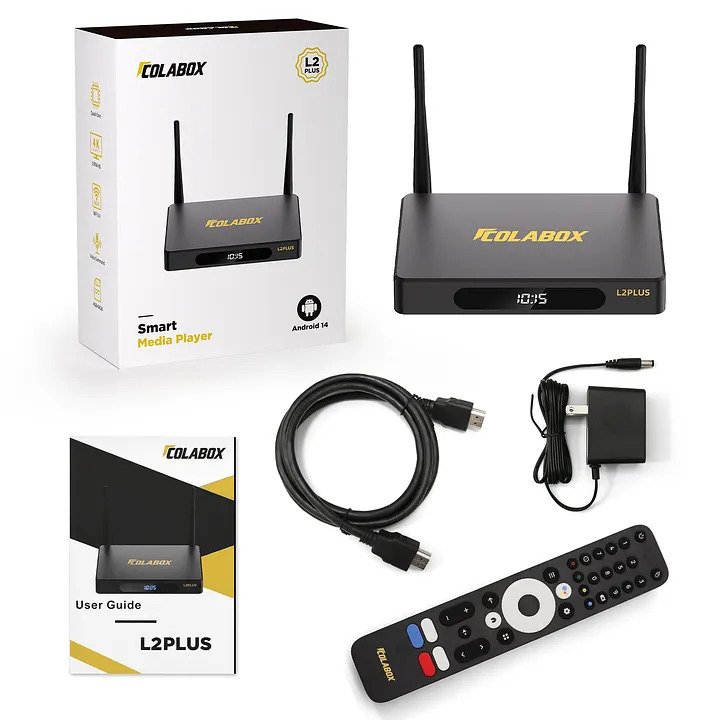
Debuting in late 2025 as the crown jewel of the new L2 series, this box isn’t just another generic Android player. It’s a specialized, high-performance hub designed to kill the “buffering” wheel and simplify your digital life. With a beefed-up 4GB of RAM, a massive 64GB of storage, and WiFi 6 capabilities, the L2 Plus is built for the user who is tired of compromise.
In this deep-dive review, we’re going to look under the hood. Is the 6K resolution actually noticeable? Does the 7-day Time Shift live up to the hype? And most importantly, is it worth your hard-earned cash in 2026?

Design & Build: A Box That Actually Looks Premium
Most streaming boxes look like cheap plastic hockey pucks that you want to hide behind your TV. The Colabox L2 Plus takes a different route.
It features a sturdy metal housing that feels industrial and premium. But the metal isn’t just for show—it’s functional. One of the biggest killers of streaming hardware is heat. When a device gets hot, the processor throttles, and your video starts to stutter. The L2 Plus uses its metal chassis combined with precision-cut ventilation holes on both sides to stay cool even during a 10-hour binge-watch.
Visually, it sports a signature Colabox blue accent that gives it a “tech-forward” vibe. It looks great sitting next to other high-end gear, like the premium projectors we discussed in our Valerion VisionMaster Max Review.
🔥 Pro Tip: If you’re building a clean home theater setup, the L2 Plus is compact enough to fit anywhere but stylish enough to leave out in the open.

COLABOX Full Setup Guide & App Tutorial: Start Streaming in Minutes!
The UI Revolution: Sophistication in Gray and Black
If you used the older L1 models, you’ll remember the interface was functional, but maybe a bit basic. The L2 series changes the game entirely.
The new UI is a complete redesign. We’re talking a sophisticated gray and black theme with high-contrast, razor-sharp text. It feels like moving from an old flip phone to a modern smartphone.
- Effortless Navigation: Everything is organized with smart filters. You aren’t scrolling through endless lists; you’re clicking exactly where you need to go.
- Resume-Play & History: Just like the premium apps (Netflix, Prime), the L2 Plus tracks your Favorites and History.
- Family-Friendly: Even though it’s “pro-level” hardware, the interface is simple enough that your kids or your less-than-tech-savvy parents can use it without calling you for help every five minutes.
Technical Deep Dive: Why 4GB RAM Matters
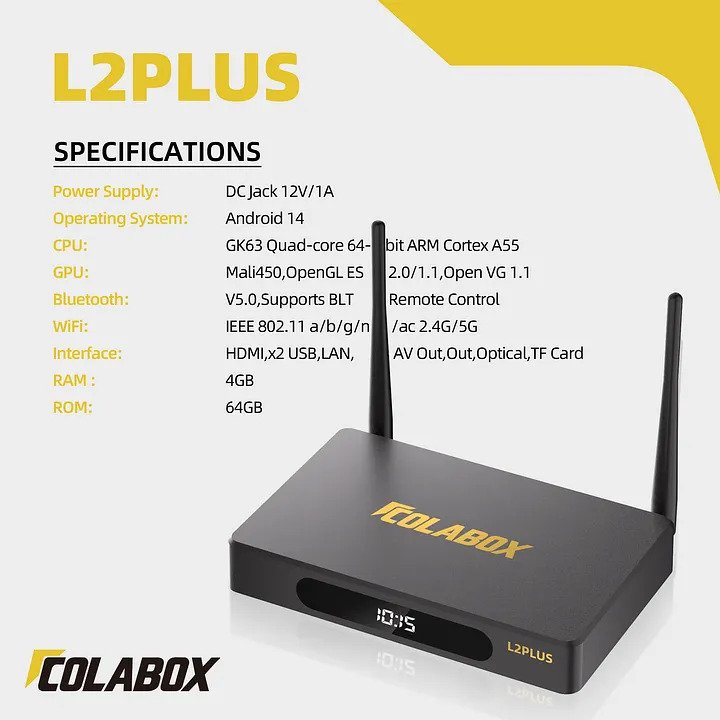
In 2026, 4GB of RAM is the “sweet spot” for Android 14. Many budget boxes still limp along with 2GB, which leads to app crashes and laggy menus. The Colabox L2 Plus uses that extra memory to ensure that when you click an app, it opens now.
The Storage Factor: 64GB is the New Standard
Why do you need 64GB? Because apps are getting bigger. Between system updates, high-res cache files, and the apps themselves, 8GB or 16GB just doesn’t cut it anymore. With 64GB, you can download your entire library of streaming services, local media players, and even light games without ever seeing a “Storage Full” warning.
| Feature | Specification |
| OS | Android 14.0 |
| Processor | GK63 Quad-core 64-bit ARM Cortex A55 |
| RAM | 4GB DDR |
| Storage | 64GB eMMC |
| Network | 1000Mbps Ethernet / WiFi 6 |
| Video | H.265 6K@60fps |
The Game Changer: 7-Day Time Shift & Playback
This is the feature that sets the L2 Plus apart from the “sticks.” The previous generation allowed for an 8-hour rewind. That was fine for catching a show you missed by an hour.
But the L2 Plus offers a massive 7-day Time Shift.
Imagine it’s Tuesday, and you realize you missed the big game on Sunday. Or you forgot to watch the season finale of your favorite drama last Thursday. With the L2 Plus, you can literally travel back in time up to 7 days and play back content as if it were live. No separate DVR, no extra monthly fees. Just pure convenience.
Connectivity: WiFi 6 and Gigabit Ethernet
If you live in a crowded apartment complex or a house with 20+ connected devices, you know the struggle of “interference.”
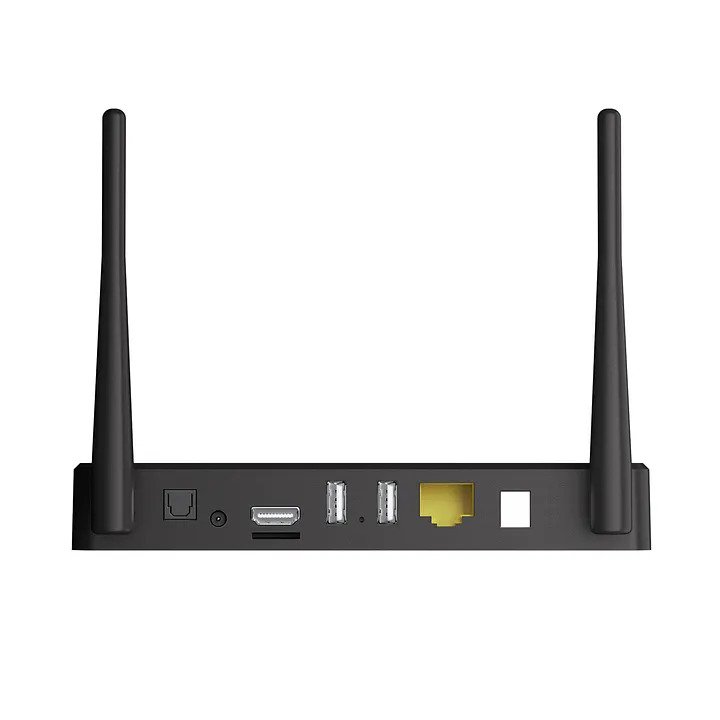
The Colabox L2 Plus supports WiFi 6. This isn’t just a marketing buzzword; WiFi 6 allows the box to communicate more efficiently with your router, reducing latency and increasing speeds even when the rest of the family is on Zoom calls or gaming.
And for the purists? You get a 1000Mbps Gigabit Ethernet port. If you are streaming in 4K or 6K, a hardwired connection is the only way to go for 100% stability. This level of connectivity is something we also praised in our Ottocast P3 Pro AI Box Review, proving that stable data is the backbone of modern entertainment.
Enhanced Voice Command: Put Down the Keyboard
Typing out movie titles with a remote is the ultimate “first-world problem,” but it’s still annoying. The L2 Plus comes with an improved Bluetooth Voice Remote.
After a quick pairing, you can just hold the button and say, “Search for 2026 Action Movies” or “Open YouTube.” The response time is significantly faster than the L1 models, with higher accuracy in voice recognition. It makes the box feel less like a tool and more like an assistant.
Cinematic Visuals: The 6K Experience
While 4K is the current standard, the L2 Plus is future-proofed with 6K resolution support.
What does this mean for you today? Even if you don’t have a 6K TV, the hardware’s ability to decode 6K means that 4K content looks crisper, deeper, and more fluid. The Mali450 GPU ensures that motion blur is minimized—perfect for high-octane sports or action sequences.
If you’re pairing this box with a high-end audio/visual setup, perhaps involving something like the Ikarao Break X1 Karaoke Machine, you’re creating an all-in-one entertainment powerhouse that can handle anything from cinema night to a full-blown house party.
Colabox L2 Plus vs. The Competition: A Quick Comparison Chart
When looking for a streaming devices comparison chart, users usually want to know how the big names stack up against independent powerhouses.
| Feature | ColaBox L2 Plus | Fire Stick 4K Max | Apple TV 4K (2025) |
| OS | Android 14 (Open) | FireOS (Locked) | tvOS (Closed) |
| RAM | 4GB | 2GB | 4GB |
| Storage | 64GB | 16GB | 64GB/128GB |
| Sideloading | Easy / Native | Restricted | No |
| Ethernet | 1000Mbps | Adapter Required | 1000Mbps |
Why It Beats the Fire Stick: The “What Is Better Than Fire Stick” Answer
A common question in 2026 is: “Is Netflix no longer compatible with Fire Stick?” While Netflix still works, the aggressive updates from Amazon have made many older sticks sluggish, and the “locked” ecosystem makes sideloading a chore.
If you are looking for what is better than Fire Stick for streaming, the ColaBox L2 Plus is the answer. Because it runs on a “clean” version of Android 14, you aren’t forced to look at Amazon’s ads every time you turn on the TV. It is widely considered the best streaming device for sideloading, allowing you to install custom media players, IPTV tools, and niche apps that the big tech stores often block.
Design & Build: Premium Specs for 2026
The L2 Plus features a sturdy metal housing with dual-side ventilation. This is crucial because high-performance streaming generates heat. If you’ve ever had a cheap stick overheat during a movie, you know why this matters. It’s a “pro-grade” build that complements high-end displays, like the ones we reviewed in our Valerion VisionMaster Max Review.
Performance: The 6K & WiFi 6 Advantage
With 4GB RAM and a GK63 Quad-core processor, the L2 Plus handles 6K resolution at 60fps without breaking a sweat. Whether you’re watching 4K live sports or using it as the hub for your Ikarao Break X1 Karaoke Machine, the lag-free experience is noticeable.
Plus, with WiFi 6 support, you get stable speeds even if your kids are gaming in the next room. It’s the same level of seamless connectivity we loved in the Ottocast P3 Pro AI Box Review.
The 7-Day Time Shift: Never Miss a Moment
While most devices give you a tiny window to catch up, the ColaBox L2 Plus offers up to 7 days of Time Shift and Playback. This makes it arguably the best streaming device for IPTV users who need to catch up on live global broadcasts or sports games from earlier in the week.
Stop paying for hardware that limits your choices. Get the most powerful, open-access box of the year.
The 2026 Cord-Cutter’s Master FAQ: Everything You Need to Know
Since the release of the COLABOX L2 series, my inbox has been flooded with questions. With so many options on the market—from big-box brands to high-end independent units—choosing the best streaming media player in 2026 can feel like a full-time job.
Below, I’ve broken down the most common questions to help you decide if the L2 Plus is the right fit for your living room.
What is the best media streamer for 2026?
The market is divided. If you want a locked-down, ad-heavy experience, the big-name sticks are still there. However, if you want the best media streamer for 2026 in terms of raw power and freedom, the COLABOX L2 PLUS takes the lead. With 4GB of RAM and an open Android 14 OS, it handles 6K content and high-end apps without the lag that plagues cheaper devices.
What’s the best streaming service that has everything?
Here’s a truth bomb: there is no single “service” that has every movie, show, and live sports game. That’s why the hardware you choose is so important. The “best service” is actually a combination of apps. The L2 Plus is the best streaming box with all channels capability because it allows you to consolidate your subscriptions (Netflix, Prime, Disney+) alongside free-to-air apps and live IPTV services in one sleek interface.
Is it better to buy a Fire Stick or a smart TV?
Actually, it’s usually better to buy a dedicated streaming box like the L2 Plus. Smart TVs often have underpowered processors that become slow after a year or two. A Fire Stick is portable but limited by Amazon’s ecosystem. A dedicated box provides better cooling, more storage, and faster updates, ensuring your “Smart TV” stays smart for years to come.
Which is the best streaming media player 2026 USA available without subscriptions?
If you want to avoid monthly fees, look for a device that supports a wide range of free content apps. The COLABOX L2 PLUS is a top choice for a streaming media player without subscriptions because it comes pre-loaded with the Google Play Store. You can install thousands of free, ad-supported apps like Tubi, Pluto TV, and Freevee, giving you a “cable-like” experience for $0 per month.
What is the best streaming device for hotels?
Travelers need two things: portability and strong connectivity. The L2 Plus is the best streaming device for hotels because of its WiFi 6 support. Hotel WiFi is notoriously crowded and slow; WiFi 6 allows the L2 Plus to maintain a stable 4K connection even when every other guest in the building is trying to stream at the same time. Plus, its compact metal build means it can survive being tossed in a carry-on.
Is there a streaming devices comparison chart I should follow?
When looking at a streaming devices comparison chart, you should prioritize three things: RAM (at least 4GB), Storage (at least 32GB), and OS Version (Android 14). The L2 Plus hits all these marks, often doubling the specs of the “budget” sticks you’ll find at big-box retailers.
What is the best streaming device for free content?
The “best” device is one that doesn’t “gatekeep” your apps. Because the L2 Plus is an open Android system, it is widely considered the best streaming device for free content and sideloading. You aren’t restricted to what a specific manufacturer wants you to see—you have the freedom to install any legal media player or content aggregator you choose.
What exactly comes in the box?
The packaging includes the Colabox L2 Plus unit, one Bluetooth Voice Remote, an HDMI cable, a power cord, and a user manual.
Is the setup complicated?
Not at all. It runs on Android 14, so it walks you through the setup on-screen. It’s mostly just connecting to your WiFi and signing in.
Do I need a VPN?
No, a VPN is not required for standard operation. You just connect to your home network and start streaming.
How many TVs can I use with one box?
One box is designed for one TV at a time to ensure the best performance and signal quality.
What internet speed do I need?
For 4K/6K streaming, we recommend at least 100Mbps, though the box can handle much faster speeds thanks to its Gigabit port.
What is the best media streaming device for 2026?
The ColaBox L2 Plus is a top contender for 2026 due to its 64GB storage, WiFi 6 capabilities, and the freedom of Android 14. It offers more flexibility than Roku or Fire TV.
What is the #1 TV streaming platform?
While Roku and Fire TV have the most users, Android TV (used by ColaBox) is the #1 choice for “power users” who want to customize their experience and use the best streaming device for sideloading.
Is there a streaming box with all channels free?
No hardware “gives” you every channel for free legally. However, the ColaBox L2 Plus is the best streaming device for free content because its open Android system allows you to install legal free-to-air apps (like Pluto TV, Tubi, and Peacock) and media managers like Kodi.
What is the best device to use for streaming IPTV?
The ColaBox L2 Plus is frequently cited as the best streaming device for IPTV because of its 1000Mbps Ethernet port and massive RAM, which prevents the buffering commonly found on cheaper sticks.
Is the setup complicated?
Not at all. Just follow the on-screen prompts. It’s as easy as setting up a new smartphone.
Does it support OTA (Over-The-Air) updates?
Yes. ColaBox provides regular OTA updates to keep your system optimized and secure against 2026’s latest tech shifts.

ColaBox L2Plus Review: The Best Android 14 TV Box to Save You Money in 2026!
The Final Verdict: Is It Worth It?
The Colabox L2 Plus isn’t trying to be the cheapest box on the market. It’s trying to be the best box for the money.
By focusing on the “Four Pillars” of streaming—Cooling (Metal Build), Speed (4GB RAM), Storage (64GB), and Connectivity (WiFi 6)—Colabox has created a device that will still be relevant in 2028 and beyond.
Final Summary for the COLABOX L2 PLUS
| Pros | Cons |
| 7-Day Time Shift: Never miss a live show again. | Premium Price: $309 is an investment. |
| 64GB Storage: Plenty of room for apps and recordings. | Power: Requires a dedicated wall outlet (not USB-powered). |
| WiFi 6 & Gigabit: Zero-buffer 4K/6K streaming. |
If you’re tired of the “budget” experience and want a device that feels as upscale as your high-end smartphone, the L2 Plus is a no-brainer. It’s smooth, it’s durable, and it’s arguably the most “human-centric” streaming interface we’ve tested this year.
Final Rating: 9.1/10
- Performance: 9.5/10
- Versatility: 10/10
- Value: 8.5/10
How We Review: Our Commitment to Transparency
Trust is the most important part of any product review. At Shoppy Express, we don’t just skim the spec sheet; we dive deep into real-world usability to ensure every recommendation meets our high standards for performance and value. We know that choosing the right tech is an investment, which is why we follow a strict editorial methodology to remain unbiased and conversion-focused. If you’re curious about the rigorous testing, selection criteria, and integrity standards we use to evaluate the gear featured on this site, feel free to explore Our Process. We believe in total transparency so you can shop with 100% confidence.
Disclosure: We may earn a small commission from qualifying purchases made through our links to help run our firm—at no extra cost to you. All product images used are sourced from the original suppliers.