If your refrigerator looks like a paper tornado hit it—soccer schedules, school notes, dentist appointments, grocery lists, birthday reminders, and sticky notes hanging on for dear life—you already know how hard it can be to keep a family organized.
The funny thing is, most families don’t have a shortage of calendars. They have too many of them.
One person uses Google Calendar. Another lives on an iPhone. School events arrive by email. Sports schedules are somewhere else. Then there are chores, shopping lists, meal plans, appointments, and those little reminders that somehow get forgotten five minutes after somebody mentions them.
That’s exactly the problem the Apolosign 27-Inch Digital Calendar is trying to solve.
Instead of forcing everyone to open another app, this large wall-mounted touchscreen puts the household schedule and everyday family tasks in one place.
I’ve looked closely at what this 27-inch digital family planner offers, and there’s a lot to like here. But at $569.99 on Amazon in the U.S., it’s not an impulse purchase.
So the real question is simple:
Is the Apolosign 27-Inch Digital Calendar actually worth putting on your wall, or would you be better off with a cheap tablet, TV, or old-fashioned whiteboard?
Let’s get into it.
Apolosign 27-Inch Digital Calendar: My Quick Take
The first thing that stands out about the Apolosign is the 27-inch screen.
That’s a big deal for a family calendar.
You aren’t dealing with a tiny display that requires everyone to walk up and squint at tomorrow’s appointments. The whole idea is to make the household schedule visible from across the room.
I also like that the Apolosign goes beyond simply displaying dates.
You get calendar synchronization, chores, rewards, shopping lists, to-do lists, meal planning, reminders, Android functionality, and smart-home features.
That makes it much closer to a family command center than a traditional digital calendar.
But I’m not going to pretend the price isn’t a consideration.
At $569.99, you need to actually use those features to get your money’s worth.
What I like most
- Huge 27-inch shared display
- Multiple calendar integrations
- Chore and reward tracking
- Shopping and to-do lists
- Meal-planning tools
- Android-based functionality
- Smart-home integration
- No required monthly subscription for core features
What gives me pause
- $569.99 is a lot for a family calendar
- It needs a permanent wall location
- The standard model is 1080p rather than 4K
- Some households simply won’t need all these features
- Setup involves accounts, calendar connections, and connected services
Apolosign 27-Inch Digital Calendar Specifications
Here’s what you’re getting with the standard 27-inch model:
| Specification | Details |
|---|---|
| Brand | Apolosign |
| Screen size | 27 inches |
| Resolution | 1920 × 1080 |
| Touchscreen | 10-point touch |
| Aspect ratio | 16:9 |
| Brightness | 300 nits |
| Contrast ratio | 1300:1 |
| RAM | 4GB |
| Storage | 64GB |
| Processor | RK3576 octa-core |
| Operating system | Android |
| Installation | Wall-mounted |
| Calendar support | Google, Apple/iCloud, Outlook and others |
| Subscription | No required subscription for core features |
| Amazon U.S. price checked | $569.99 |
One thing I would watch when shopping is the model name.
Apolosign also sells a 27-inch 4K version, which is a separate product.
The standard 27-inch model uses 1920 × 1080 resolution. For a family calendar, that’s perfectly reasonable. You’re mostly looking at appointments, lists, chores, reminders, and household information.
If you plan to turn the screen into more of an entertainment or photo display, the 4K version becomes more interesting.
For calendar use alone, I wouldn’t pay extra for 4K just because the number sounds better.
What Is the Apolosign 27-Inch Digital Calendar?
I think the easiest way to understand this product is to forget the word calendar for a moment.
It’s really a large touchscreen family organizer that happens to put the calendar at the center.
The idea is pretty straightforward.
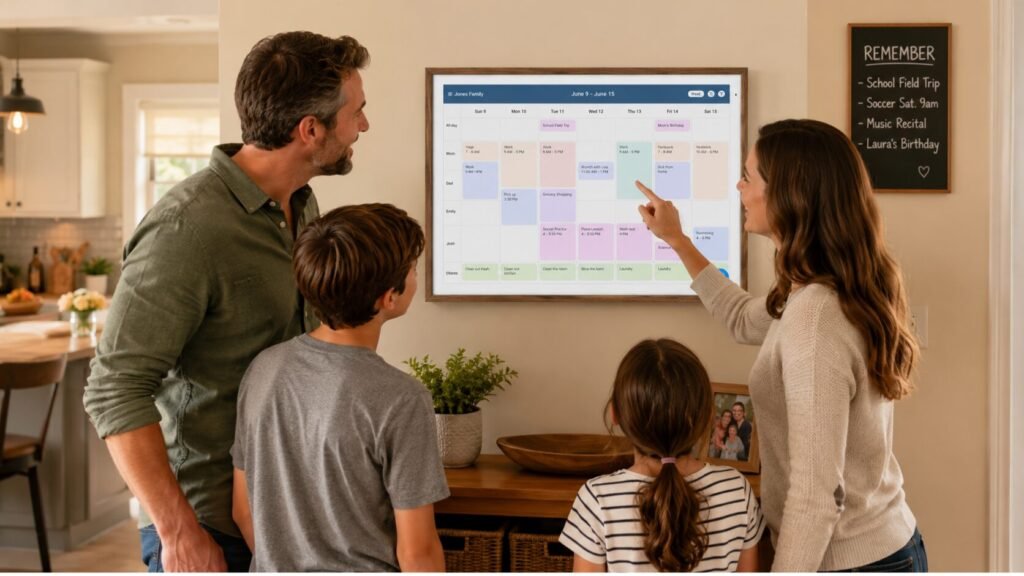
Instead of having everybody check their own phone, you put one large display somewhere everyone naturally passes through—usually the kitchen, hallway, or family room.
That screen can show things such as:
- Family appointments
- School activities
- Sports schedules
- Chores
- Reminders
- Shopping lists
- To-do items
- Meal plans
- Family information
That’s what makes the concept interesting.
A phone calendar is great for you.
A wall calendar is great for everyone.
The video above gives a quick look at how the Apolosign digital calendar is designed to work as a shared family planning display.
The 27-Inch Screen Is the Whole Point
I’ve seen plenty of digital calendars that are basically oversized tablets.
The problem is that they’re still small enough that only one person comfortably uses them at a time.
The Apolosign takes the opposite approach.
The 27-inch display is designed to be seen by several people.
That’s particularly useful for families because you can walk past the screen and get a quick idea of what’s happening without opening an app.
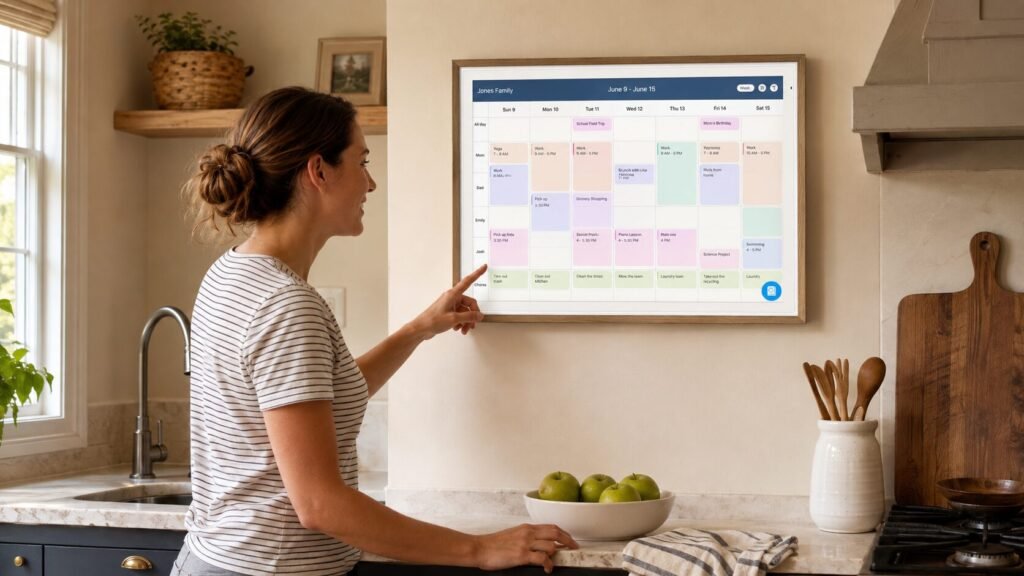
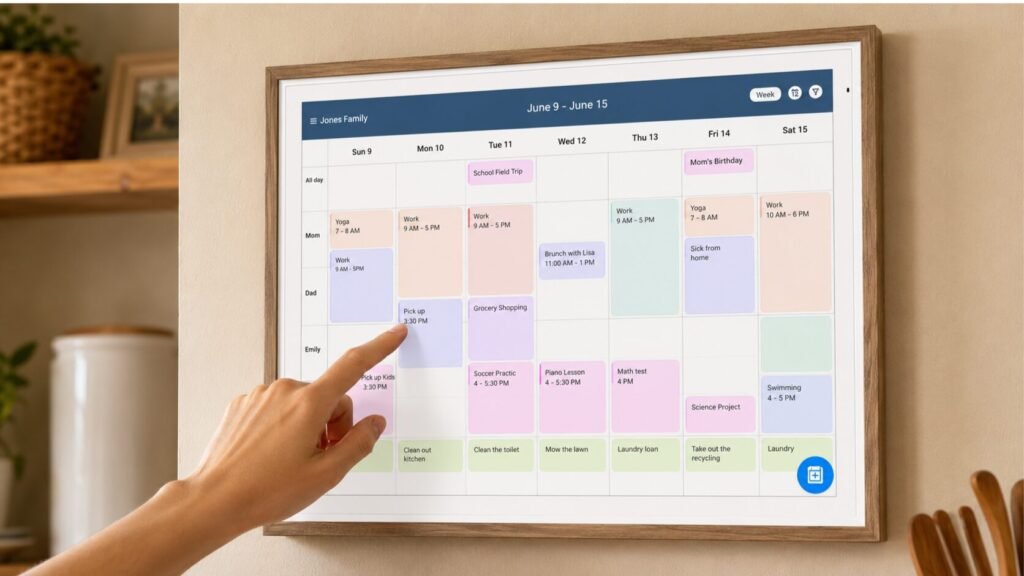
If Monday has three appointments, Tuesday has soccer practice, and Wednesday has a dentist appointment, you can see the week at a glance.
That visibility is the biggest reason I’d consider this over simply mounting a cheap tablet on the wall.
Syncing Google, Apple and Outlook Calendars
This is one of the features I’d pay attention to if your family uses different phones.
Apolosign supports calendar services including Google Calendar, Apple/iCloud, Microsoft Outlook, and others.
That’s important because getting an entire family onto one calendar platform isn’t always realistic.
One parent might use Google.
Another might use an iPhone and Apple Calendar.
Work appointments could be sitting inside Outlook.
Meanwhile, kids have school and sports schedules coming from completely different places.
Being able to pull those schedules together gives you one shared view.
And honestly, that’s much more useful than simply having another screen showing a calendar nobody remembers to update.
Color-Coded Scheduling Makes a Difference
A shared calendar gets messy quickly if every appointment looks identical.
Color coding helps separate people and activities so you can understand the schedule without reading every single entry.
For a family with multiple children, this becomes especially useful.
You can quickly see who has practice, who has an appointment, and where the conflicts are.
That’s one of those features that doesn’t sound revolutionary but becomes much more valuable once the household schedule gets complicated.
Chore Tracking and Rewards
Here’s where the Apolosign starts to feel more like a family-management system.
The device includes chore management and reward features.
Parents can assign tasks, while family members can track what needs to be completed.
I like this concept because chores are one of those things that can create unnecessary arguments.
Instead of asking for the third time whether someone took out the trash, the task can live on the shared family screen.
The reward system also gives kids a more visual way to see what they’ve completed and what they’re working toward.
Of course, no touchscreen is going to make cleaning a bedroom exciting.
But making responsibilities visible is still a useful improvement over shouting reminders from another room.
Shopping Lists Are More Useful Than They Sound
A shopping list might not sound like a reason to spend hundreds of dollars on a digital calendar.
But location changes everything.
If the Apolosign is mounted in the kitchen, the shopping list is right where the family naturally spends time.
Someone finishes the cereal?
Add it.
You notice you’re almost out of coffee?
Add it.
Need something for dinner tomorrow?
Put it on the list.
The same idea works for household to-do lists.
Instead of writing something on a scrap of paper and watching it disappear underneath the mail, you can keep the task on the family display.
Meal Planning Gives It a Real Kitchen Use
The meal-planning features are another reason the kitchen makes sense as the installation location.
You can organize meals, recipes, and other food-related information alongside the family’s schedule.
That means your Sunday planning session can potentially cover more than appointments.
You can look at the week ahead, decide what you’re cooking, and keep track of what needs to be purchased.
If you’re into connected kitchen gadgets, you may also want to check out our INKBIRD INT-12E-BW Wireless Meat Thermometer review.
It’s a completely different type of product, but it fits the same general idea of using technology to take some of the guesswork out of everyday cooking.
Android Mode Makes the Screen More Flexible
Another thing I like about the Apolosign is that you’re not locked into one calendar interface.
The device runs Android and offers an Android mode that allows additional customization and apps.
That gives you more freedom than a basic dedicated family planner.
Depending on the app and compatibility, the screen can potentially be used for things like:
- Weather
- Photos
- Media
- Widgets
- Smart-home controls
- Other Android-compatible applications
That’s useful because your family’s needs may change.
Maybe you buy the screen mainly for scheduling today, but six months from now you’re using it for recipes, weather, photos, or smart-home controls.
The downside is that more flexibility can also mean more setup.
If all you want is a giant calendar, you may not care about Android functionality at all.
Google Assistant and Gemini Voice Features
Voice control is another feature that makes sense on a wall-mounted family display.
Apolosign promotes Google Assistant and Gemini-related functionality for voice interaction.
The appeal is obvious.
You’re cooking dinner and want to check something.
Your hands are full of groceries.
You’re cleaning the kitchen.
You don’t necessarily want to stop and pick up your phone.
A voice-enabled wall display can be more convenient in those situations.
The smart-home side is also interesting.
With compatible Google Home devices, the Apolosign can provide another way to interact with parts of your connected home, including compatible cameras and doorbells.
Just remember that compatibility depends on the specific smart-home products and services you’re using.
Does the 27-Inch Size Make It Too Big?
This is one area where I’d make the decision before buying.
The 27-inch display is a strength when you have enough wall space.
It’s a weakness when you don’t.
Before ordering, I’d measure the intended wall and think about:
- Viewing distance
- Wall width
- Power outlet location
- Cable routing
- Mounting height
- Glare from windows
- Whether everyone can comfortably see it
You don’t want to spend $569.99 and then discover that the only suitable wall is directly opposite a bright window.
The display is supposed to make family organization easier, not become another thing you have to work around.
Wall Mounting: What You Should Know
The 27-inch model is designed for wall mounting and comes with mounting hardware.
That’s convenient, but I wouldn’t treat installation as something to rush through.
This is a large electronic display.
Choose a secure location and use the appropriate mounting hardware for your wall.
I’d also plan your cable routing before installation.
A clean wall-mounted calendar looks great.
A power cable dangling down the wall can ruin the whole effect.
Apolosign 27-Inch Price: Is $569.99 Worth It?
Let’s talk about the elephant in the room.
$569.99 is not cheap.
At the current Amazon U.S. price you’ve provided, you’re spending more than you would on many tablets, monitors, or smart displays.
So I wouldn’t recommend the Apolosign based on the calendar alone.
The value comes from what you do with the entire system.
If you’re using:
- Multiple calendars
- Chore tracking
- Rewards
- Shopping lists
- Meal planning
- Reminders
- Android apps
- Smart-home controls
then the product starts to make more sense.
You’re not really paying $569.99 for a calendar.
You’re paying for a dedicated family command center.
But if all you want is to see tomorrow’s appointments, I’d save the money.
Does the Apolosign Require a Monthly Subscription?
This is one of the strongest points in its favor.
Apolosign currently promotes the digital calendar without requiring a recurring subscription for its core calendar and family-organization features.
That means you’re not buying the hardware and then discovering that basic functions require another monthly bill.
For a device you may keep on the wall for years, avoiding another subscription is a meaningful advantage.
As always, check the current product terms before purchasing because software features and services can change.
Apolosign Shipping: How Long Does It Take?
Shipping depends on the seller, destination, inventory, and the retailer you purchase from.
If you’re buying through Amazon, I’d use the delivery estimate shown after entering your U.S. address as the number that matters.
Don’t rely on a generic shipping statement if you need the calendar by a particular date.
Check the actual listing and checkout estimate before placing the order.
Apolosign Warranty
Apolosign currently advertises a 1-year limited warranty for its digital calendar products.
That’s worth paying attention to because this isn’t a $30 accessory.
You’re putting several hundred dollars into a large electronic device, so knowing what warranty coverage is available matters.
I’d still read the current warranty terms for your specific model and purchase channel before ordering.
Apolosign Return Policy
Apolosign currently advertises a 30-day return period.
I think that’s particularly useful with a product like this because the real test is whether your household adopts it.
The screen can have every feature in the world, but if everyone keeps checking their phones instead, you’re not getting much value from it.
If you’re purchasing through Amazon, also check the return information shown on the actual Amazon listing because retailer and seller conditions can vary.
Apolosign 27-Inch Digital Calendar Pros and Cons
Pros
The 27-inch screen is genuinely useful for families
It’s large enough for several people to see the schedule at once.
Multiple calendar services
Google, Apple/iCloud, Outlook, and other integrations make it suitable for mixed-device households.
Chore and reward tracking
A useful addition for families with children.
Shopping and to-do lists
Keeps everyday tasks visible instead of buried inside individual phones.
Meal planning
Makes the device particularly useful in a kitchen.
Android functionality
Gives you more flexibility than a basic dedicated calendar.
Smart-home integration
Compatible smart-home devices can extend its usefulness.
No required subscription for core features
That helps reduce long-term ownership costs.
Cons
The $569.99 price is significant
There are cheaper ways to display a family calendar.
It needs wall space
A 27-inch display isn’t ideal for every home.
Standard model is 1080p
Fine for calendar use, but the separate 4K model is sharper for photos and video.
You have to actually use it
A sophisticated family organizer doesn’t help if everyone ignores the screen.
More features mean more setup
Calendar accounts, smart-home services, and Android apps can add complexity.
Who Should Buy the Apolosign 27-Inch Digital Calendar?
I’d seriously consider it if your family constantly has scheduling conflicts.
If you have kids in sports, school activities, appointments, birthday parties, work schedules, chores, and a never-ending list of household tasks, having one large shared screen can make a real difference.
It’s especially appealing if people in your household naturally pass through the kitchen or family room several times a day.
The whole system depends on visibility.
You don’t have to remember to open the calendar.
It’s simply sitting there.
Who Should Skip It?
If your current calendar system already works, don’t buy another device just because it has a long feature list.
A couple with a simple schedule may never get enough value from a 27-inch family organizer to justify the price.
Someone living alone probably has even less reason to buy it.
And if your budget is tight, a tablet can handle many basic calendar functions for considerably less.
The Apolosign makes sense when you specifically want the dedicated wall-mounted family command-center experience.
Apolosign vs. a Tablet
This is probably the comparison I’d make before spending the money.
A tablet gives you:
- Lower cost
- Portability
- Battery operation
- General-purpose apps
- Smaller footprint
The Apolosign gives you:
- A much larger display
- Permanent wall placement
- Shared family visibility
- Dedicated family-organization tools
- Chore and reward features
- Large calendar presentation
- Smart-home functionality
If you want something one person can carry around, get the tablet.
If you want something everyone sees while walking through the kitchen, the Apolosign has a clear advantage.
Apolosign vs. a Traditional Whiteboard
The whiteboard is still tough to beat on price.
It’s cheap.
It doesn’t need Wi-Fi.
It doesn’t need an account.
It doesn’t need software updates.
And nobody needs instructions to use it.
But there’s a catch.
Someone has to keep writing everything down.
The Apolosign trades that simplicity for digital organization and synchronization.
If your biggest problem is that nobody remembers to update the whiteboard, going digital could be worthwhile.
If your family already keeps a perfectly organized whiteboard, there’s no reason to spend $569.99 just to make it touchscreen.
Other Apolosign Products Worth Knowing About
If you’re interested in Apolosign’s display products, we’ve also covered the Apolosign PackGo Briefcase TV.
That product has a very different purpose.
The PackGo is aimed at portable entertainment, while the 27-inch Digital Calendar is designed to stay in your home and organize the household.
So I wouldn’t choose between them based on brand alone.
They’re solving completely different problems.
For another type of product review from our site, you can also read our HiBrew H16 review if you’re comparing smart household equipment and looking at where your money is best spent.
Does It Work Well as a Kitchen Command Center?
This is probably where I see the strongest use case.
The kitchen is one of the few rooms where nearly everyone in a household naturally passes through.
That makes it a good location for something that needs to be seen.
You can check the day’s schedule while making breakfast, add something to the shopping list while cooking, check a meal plan, or see which chores still need attention.
If you’re building a connected kitchen, you might also be interested in our Tastee Smart Air Fryer review.
But I wouldn’t add smart devices just for the sake of having them.
Every gadget should solve an actual problem.
For the Apolosign, that problem is family organization.
What About Outdoor Cooking and Family Entertainment?
The Apolosign is obviously aimed at indoor household organization, but if you’re building a larger home entertainment or cooking setup, our Big Horn Outdoors 2026 review covers a completely different category of home equipment.
And for another Big Horn option, you can also see our Big Horn Aura Flex review.
I wouldn’t connect these products simply because they’re all household purchases. The reason to explore them is different: they’re useful for readers who are already researching home upgrades and want to compare what makes sense for their space and budget.
Is the Apolosign 27-Inch Digital Calendar Worth $569.99?
Here’s where I land.
If you only want a digital calendar, I don’t think you need it.
There are cheaper options.
But if you’re trying to solve a much bigger household problem, the Apolosign becomes far more interesting.
You’re getting one large display for calendars, chores, rewards, shopping lists, meal planning, reminders, Android apps, and compatible smart-home functions.
That’s a completely different proposition from buying a basic digital calendar.
The most important thing I’d ask before buying is:
Will my family actually look at this screen every day?
If everyone walks past it every morning and checks the schedule, $569.99 starts to look much more reasonable.
If everyone ignores it and goes back to their phones, you’ll have an expensive touchscreen on the wall.
Final Verdict: Apolosign 27-Inch Digital Calendar Review
The Apolosign 27-Inch Digital Calendar is a specialized product, and that’s both its biggest strength and its biggest limitation.
It isn’t the cheapest way to display a calendar.
It isn’t the smallest.
And it certainly isn’t necessary for every household.
But the idea behind it makes sense.
Put the family schedule somewhere everyone can see it.
Add chores.
Add shopping lists.
Add meal planning.
Add reminders.
Connect the calendars everyone already uses.
Then turn the whole thing into a shared household dashboard.
That’s where the Apolosign starts to earn its price.
At $569.99 on Amazon in the U.S., I’d recommend it primarily to busy families that genuinely need a centralized command center.
For everyone else, I’d save the money and use a tablet or a traditional calendar.
My bottom line:
Buy it if: your household is constantly juggling appointments, school activities, sports, chores, shopping, and multiple calendars.
Skip it if: your current phone-based calendar already keeps everyone organized or you simply want the cheapest possible solution.
For the right family, the Apolosign 27-inch can turn that chaotic refrigerator door into something much more useful: one place where everyone knows what’s going on.
Frequently Asked Questions
Does the Apolosign 27-Inch Digital Calendar require a monthly subscription?
No mandatory subscription is currently required for the core calendar and family-organization features advertised by Apolosign.
Can the Apolosign sync with Google Calendar?
Yes. Google Calendar is supported.
Does it work with Apple Calendar?
Yes. Apolosign supports Apple/iCloud calendar integration.
Can I connect Microsoft Outlook?
Yes. Microsoft Outlook is supported among the compatible calendar services.
Does the Apolosign 27-Inch have a touchscreen?
Yes. The standard 27-inch model features a 10-point touchscreen.
What is the resolution?
The standard 27-inch model uses 1920 × 1080 resolution.
Is there a 4K version?
Yes. Apolosign also sells a separate 27-inch 4K model.
Can I install Android apps?
The device uses an Android-based operating system and provides Android functionality. Specific app availability can depend on compatibility and current software support.
Can I use it for chores?
Yes. Chore-management and reward features are part of the family-organization system.
Can I create shopping lists?
Yes. Shopping and to-do list features are included.
Can I use it for meal planning?
Yes. The Apolosign includes meal-planning and recipe-related functionality.
Can the Apolosign control smart-home devices?
Compatible Google Home smart-home devices can be integrated with the display.
Does it support voice commands?
Yes. Apolosign promotes Google Assistant and Gemini-related voice functionality.
Does the 27-inch model come with a wall mount?
Yes. The 27-inch model is designed for wall mounting and includes mounting hardware.
What is the current Apolosign 27-inch price?
The Amazon U.S. price for this review is $569.99. Amazon prices can change, so check the current listing before ordering.
Does Apolosign offer a warranty?
Apolosign currently advertises a 1-year limited warranty.
What is the return period?
Apolosign currently advertises a 30-day return period. Check the specific retailer’s current return terms before purchasing.
How long does shipping take?
Shipping time depends on your location, inventory, and seller. Amazon normally provides a delivery estimate based on your address.
Is the Apolosign 27-Inch Digital Calendar worth buying?
If your family needs a centralized place for schedules, chores, reminders, shopping lists, and meal planning, it can be a worthwhile investment. If you only need a basic calendar, a less expensive tablet or display may make more sense.
One Last Thing Before You Buy
At $569.99, I wouldn’t buy the Apolosign just because it looks impressive in a product photo.
Think about your household.
Do people miss appointments?
Do chores get forgotten?
Are family calendars scattered across several apps?
Does everyone need to know what’s happening during the week?
If the answer to those questions is yes, the Apolosign starts making a lot more sense.
If your family already has everything under control, you probably don’t need another screen.